
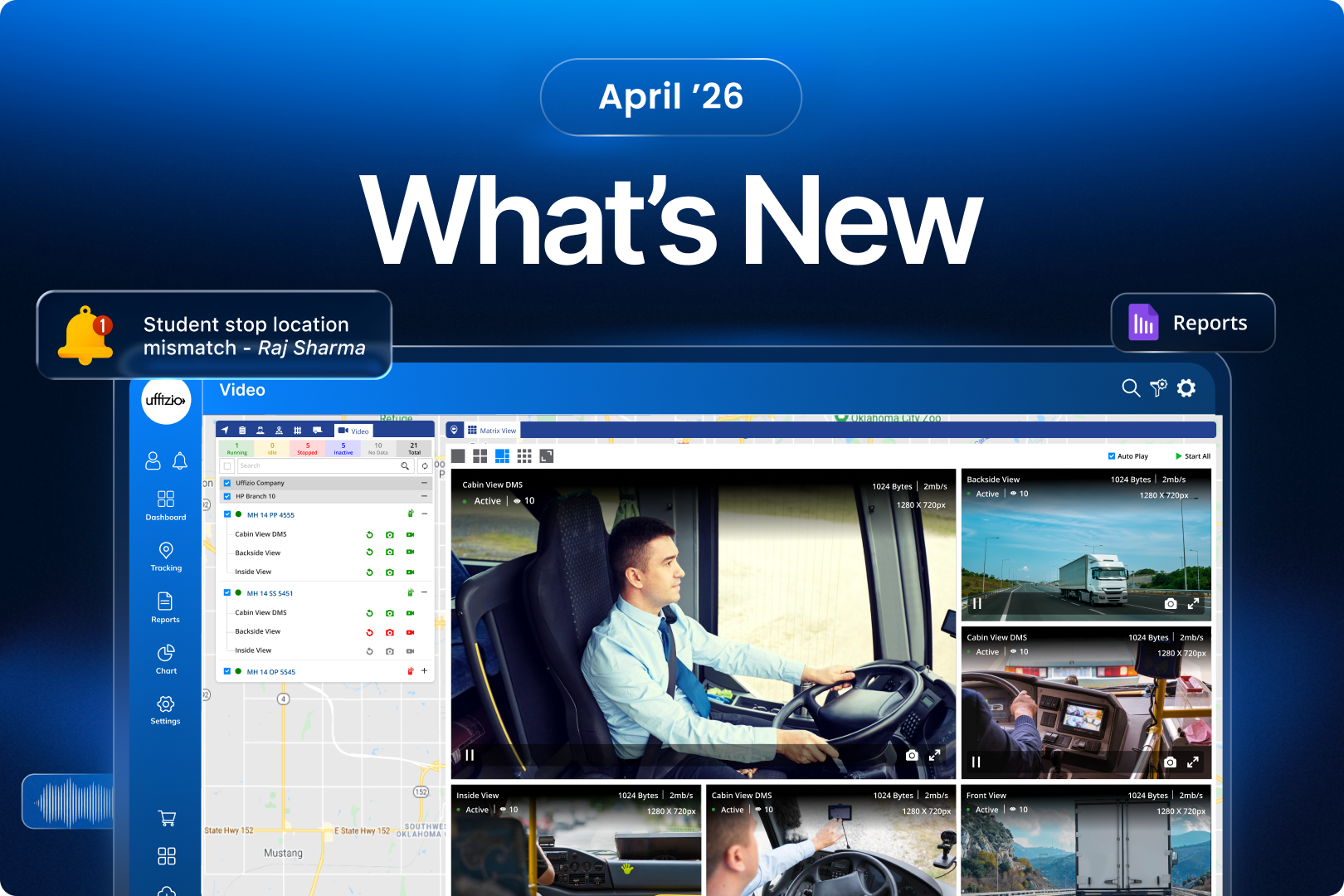
April 2026 brings a set of enhancements focused on unifying operational workflows, expanding visibility, and strengthening compliance across transport systems.
This month’s updates refine how teams interact with the platform by improving usability within existing modules, such as bringing video telematics into the main Live Tracking workflow for a more seamless monitoring experience.
At the same time, the platform expands beyond vehicle-based tracking with the introduction of school gate attendance, enabling visibility into student movement across the entire journey — not just during trips.
On the reporting and compliance side, new additions like student journey violation tracking and driver halt-time monitoring provide stronger control over safety standards and operational discipline.
Further enhancements across the Parent App and SmartBus Lite improve clarity, accessibility, and real-time communication, ensuring that both administrators and parents have more relevant and actionable information at every stage.
Overall, this release focuses on making the system more connected, transparent, and aligned with real-world transport operations.
1. SmartBus Lite Updates
1.1 Custom Alert Sound Configuration (Make Alerts Impossible to Miss)
The Challenge
Alerts are meant to grab attention, but when every alert sounds the same, they start getting ignored.
In SmartBus Lite, all alerts followed a fixed default sound. Over time, this reduces urgency. A critical alert doesn’t feel any different from a routine notification.
And in transport operations, missing an alert is not just inconvenient; it can lead to delays in response.
The Feature
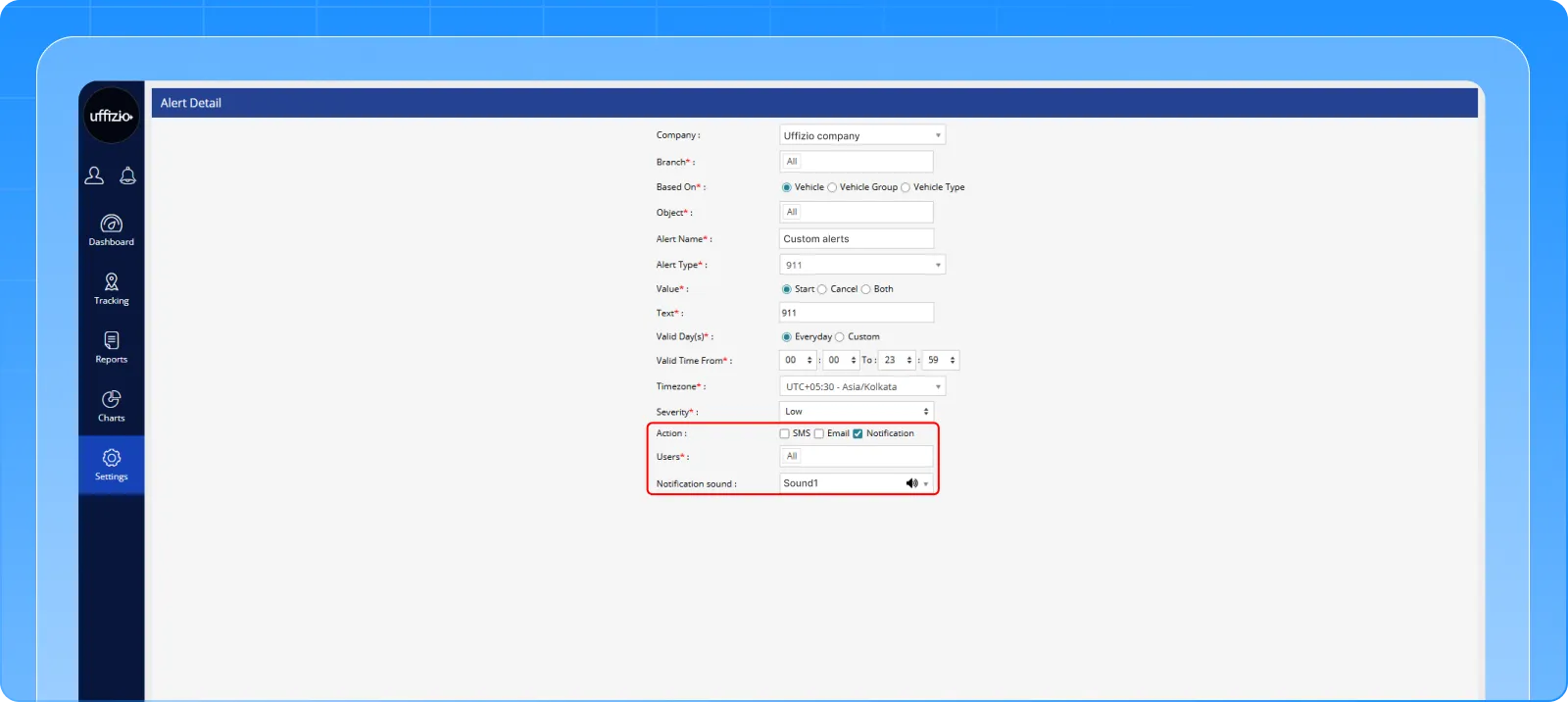
SmartBus Lite now introduces customizable alert sound settings, giving users control over how alerts are heard.
Admins can now choose from multiple alert styles, including distinct tones and voice-based notifications, directly from the Alert Configuration screen.
Once configured, the selected alert sound is applied consistently across:
- Web platform
- Manager App
- Parent App
This ensures that the same alert is recognized instantly, no matter where it is received.
The Benefit
✔ Alerts become more noticeable and harder to ignore
✔ Different alert types can be differentiated more effectively
✔ Improves response time in critical situations
✔ Creates a consistent alert experience across all platforms
Now alerts don’t just notify, they communicate urgency clearly.
1.2 Flexible Parent Tracking (Controlled Access to Multiple Vehicles)
The Challenge
Parents could only track the vehicle assigned to their child.
While this works in standard scenarios, real-world transport operations often involve exceptions, such as temporary vehicle changes or unforeseen adjustments.
In such cases, the lack of flexibility can create confusion.
The Feature
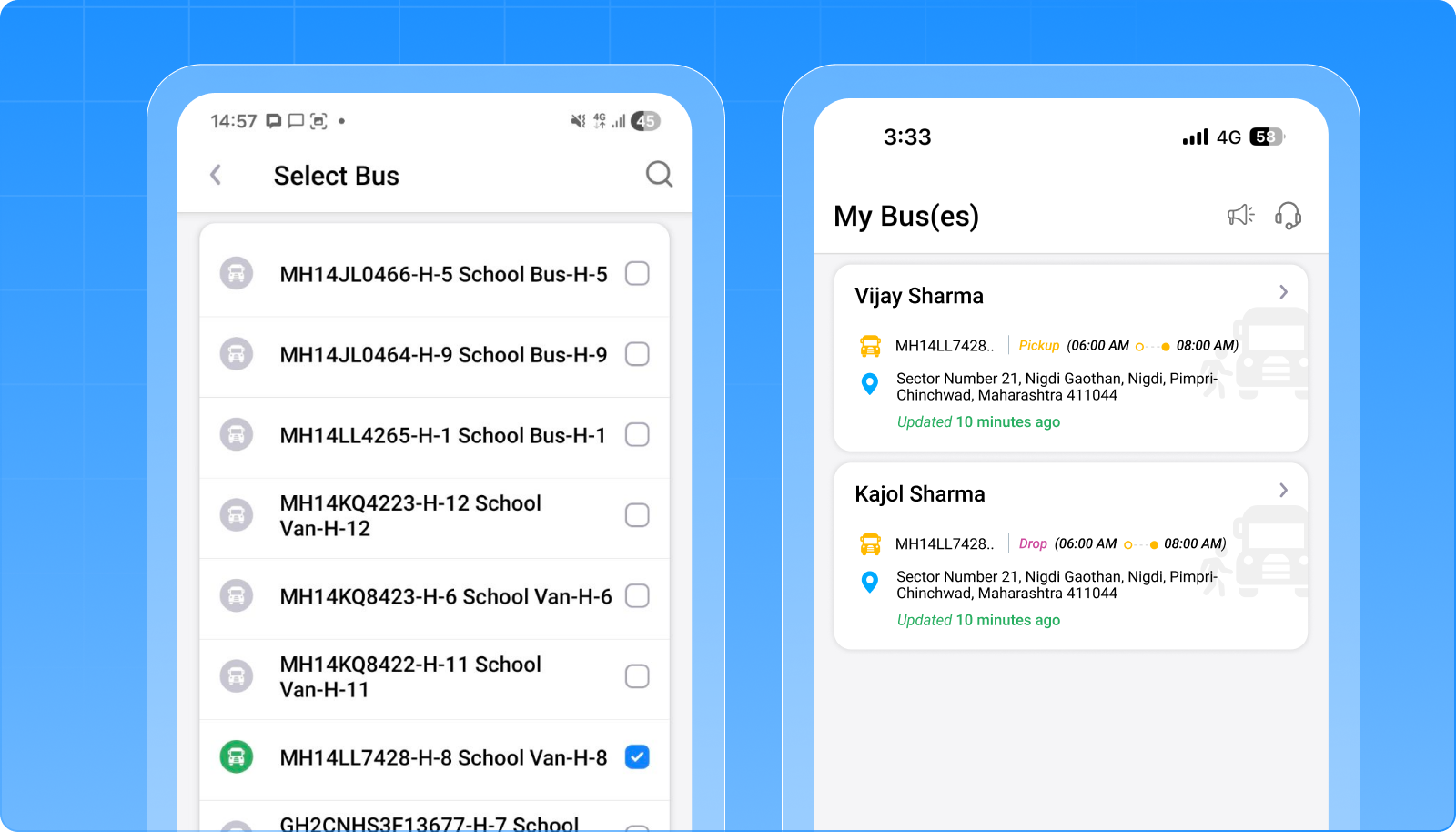
A new school-level setting now allows controlled flexibility in vehicle tracking.
When enabled, parents can:
- View a list of available vehicles
- Select any one vehicle to track during active tracking periods
This functionality is governed by clear controls:
- Only one vehicle can be tracked at a time
- Tracking remains limited to defined pickup and drop durations
- Default behavior remains unchanged if the setting is disabled
The Benefit
✔ Provides flexibility for real-world transport scenarios
✔ Helps manage temporary or unexpected changes
✔ Improves parent visibility and confidence
✔ Maintains system control while enabling adaptability
Tracking is now structured, yet flexible when needed.
1.3 Share Credentials via SMS & WhatsApp (Faster Parent Onboarding)
The Challenge
Sharing login credentials with parents was a manual process, especially during student onboarding.
This often led to delays, missed communication, and additional effort for administrators — particularly in large deployments.
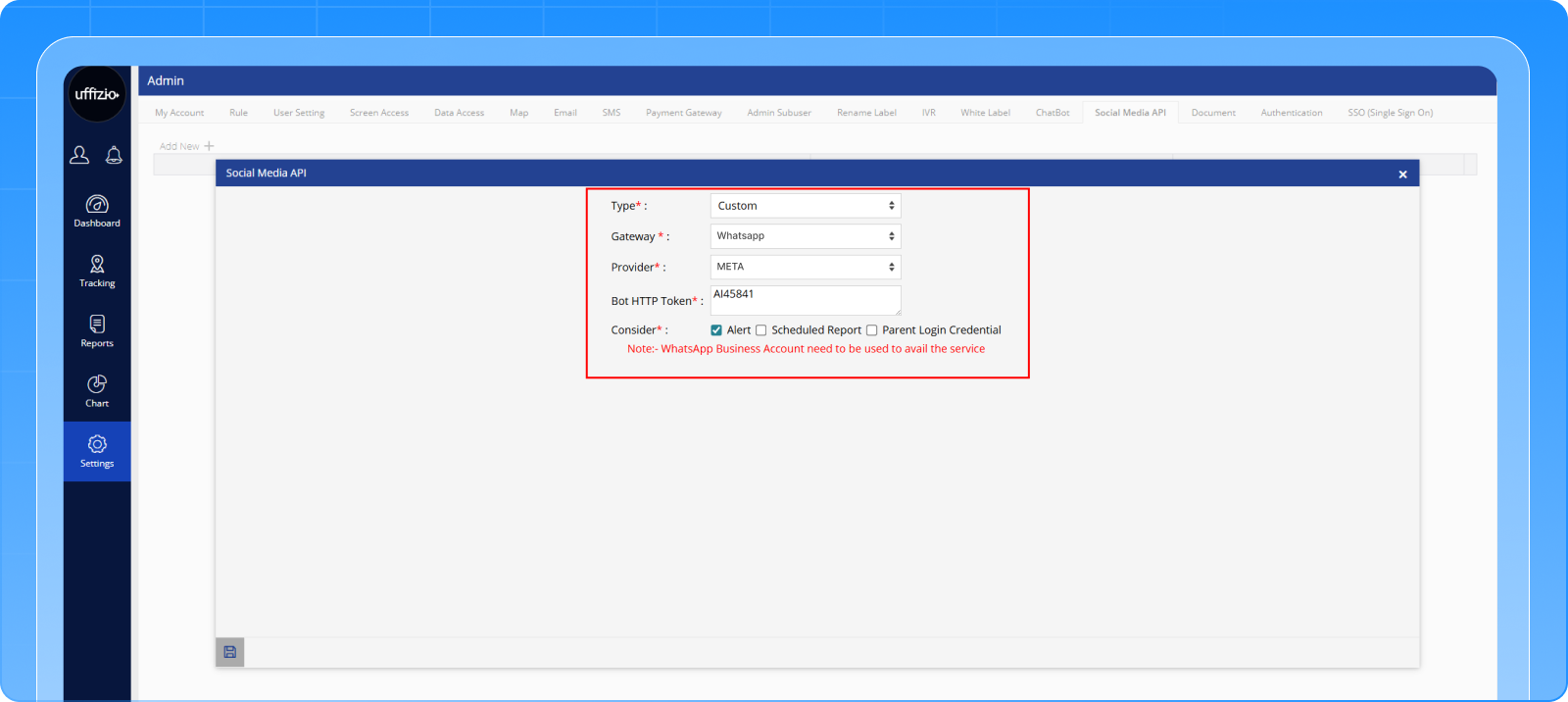
The Feature
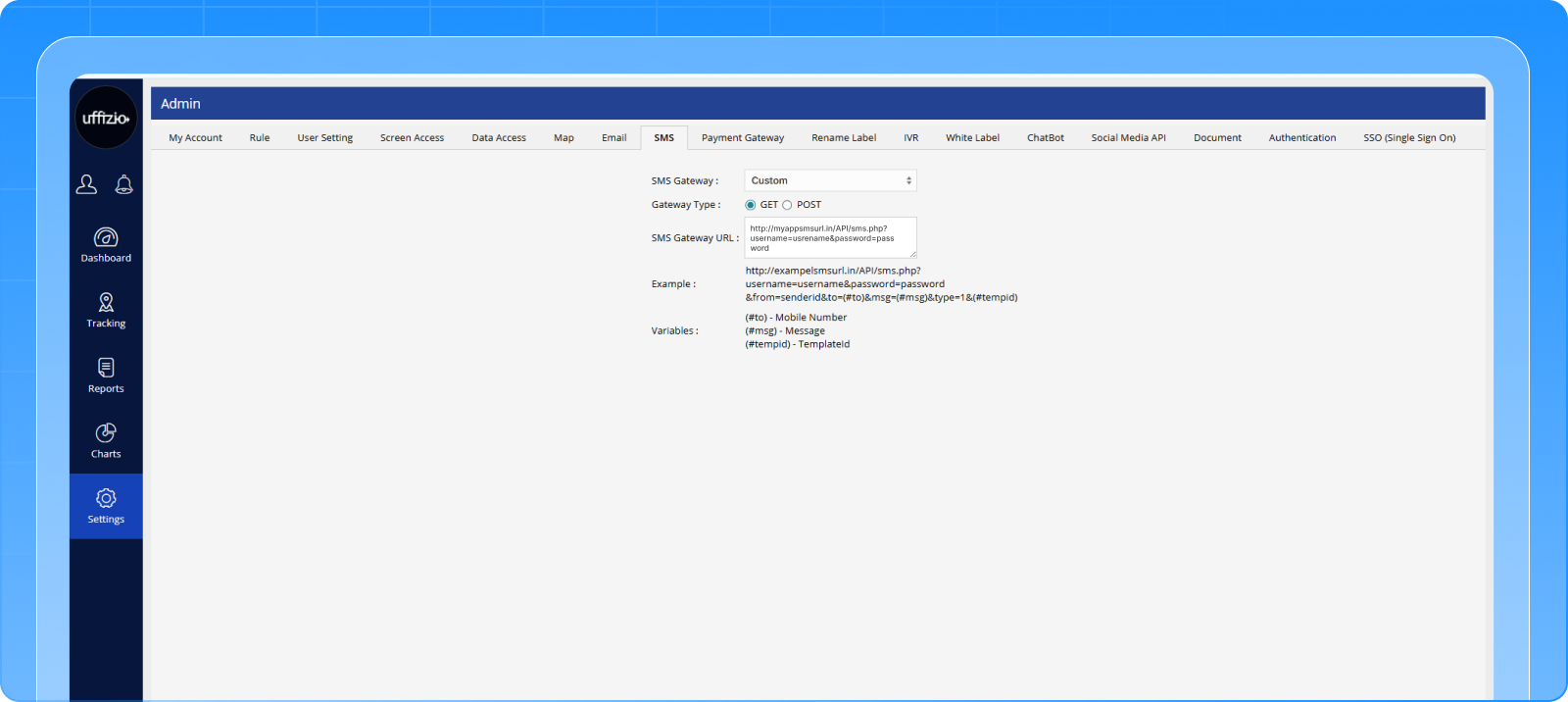
SmartBus Lite now supports automated credential sharing via SMS and WhatsApp.
With the required configurations in place, login credentials can be securely sent to parents at the time of student creation, both for individual and bulk entries.
This ensures that parents receive access details instantly through familiar communication channels.
The Benefit
✔ Speeds up parent onboarding
✔ Reduces manual administrative effort
✔ Minimizes communication gaps and errors
✔ Scales efficiently for large schools and institutions
Onboarding is now faster, simpler, and more reliable.
1.4 Next Tracking Information Card (Clear Visibility Even When Tracking is Inactive)
The Challenge
When live tracking was not active, parents only saw a generic message, without any indication of when tracking would resume.
This lack of visibility often led to uncertainty and unnecessary queries.
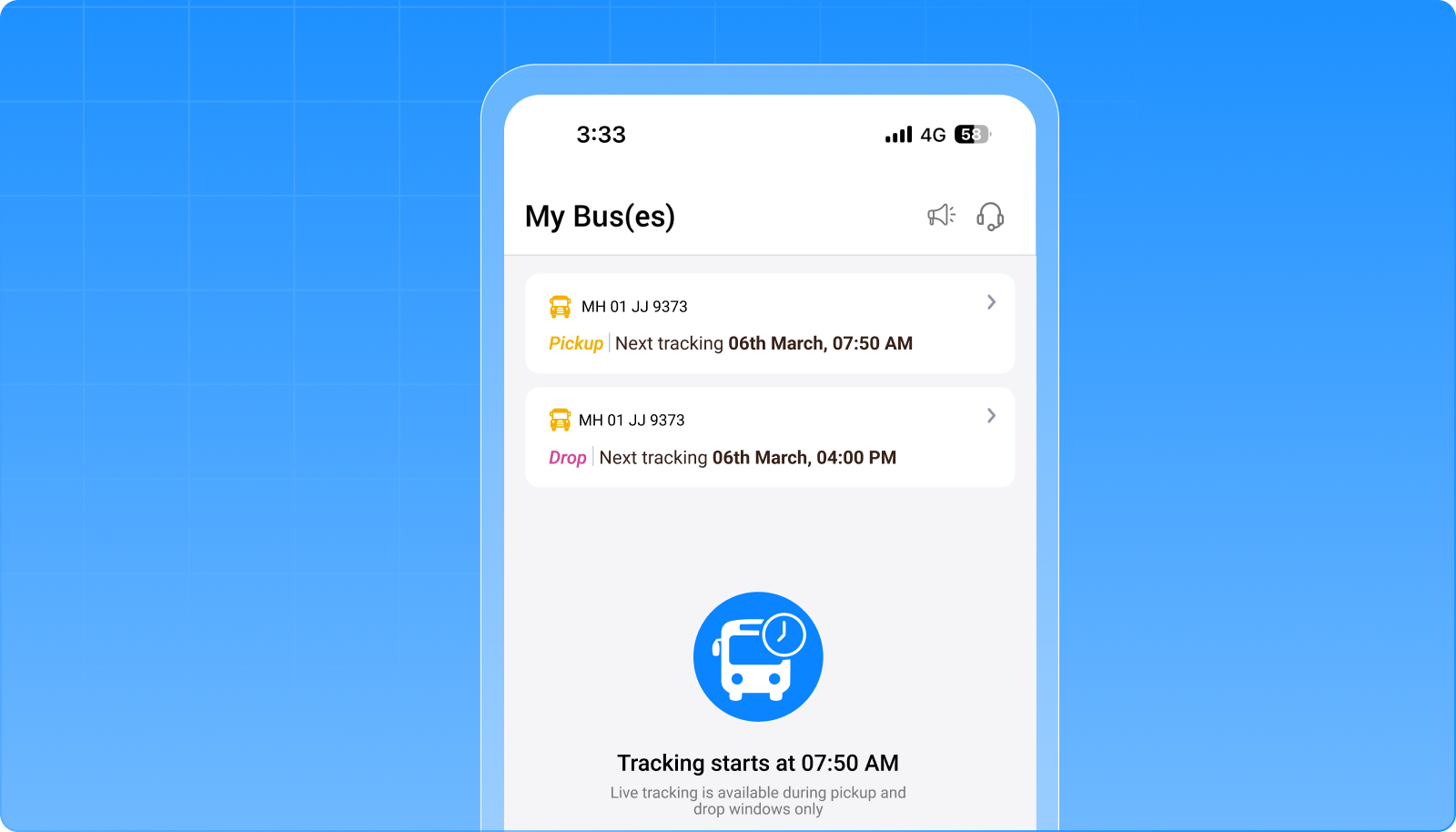
The Feature
The Parent App now displays a Next Tracking Information Card when live tracking is not currently available.
This card provides:
- The next tracking type (Pickup or Drop)
- Assigned vehicle details
- Exact date and time of the upcoming tracking session
The card appears only when:
- No active tracking is in progress
- A valid upcoming tracking schedule exists
The Benefit
✔ Provides clear visibility of upcoming trips
✔ Reduces confusion during inactive tracking periods
✔ Minimizes support queries from parents
✔ Enhances overall user experience
Even when tracking is not active, the system continues to keep parents informed and prepared.
2. SmartBus Updates
2.1 Student Stop Location Mismatch Alert (Complete Boarding & Drop Visibility)
The Challenge
Until now, alerts were triggered only when a student was dropped at the wrong location.
But what about the other half of the journey?
If a student boarded from a different pickup point, there was no alert, creating a blind spot in monitoring.
For schools and parents, this meant incomplete visibility into actual student movement.
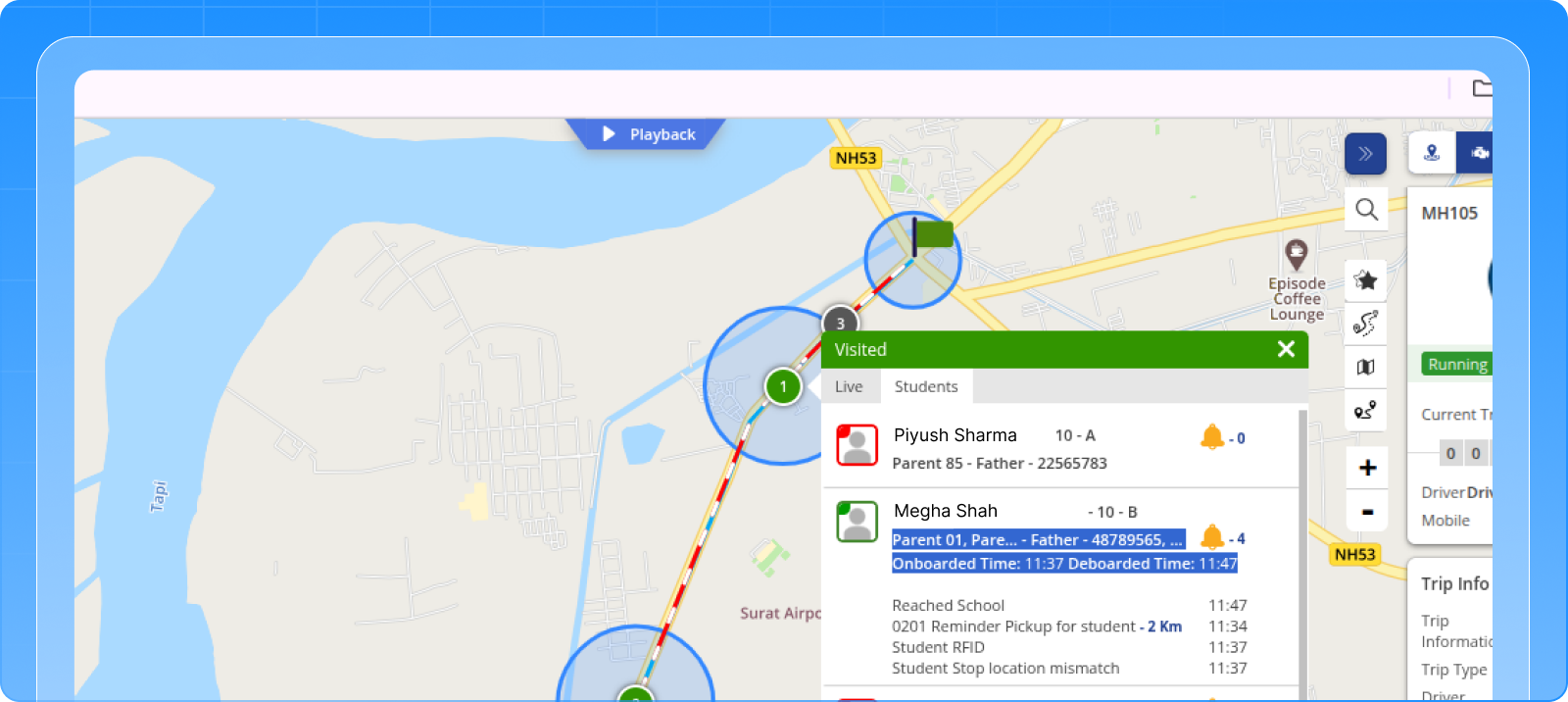
The Feature
The alert system has now been enhanced to detect both pickup and drop location mismatches.
The updated alert:
- Triggers when a student boards or drops off at a location different from the assigned stop
- Clearly indicates whether the mismatch occurred during pickup or drop
- Displays both the assigned location and the actual location for full clarity
- Is delivered to parents through the existing notification flow
The Benefit
✔ Complete visibility across the entire trip lifecycle
✔ Faster identification of unexpected boarding or drop changes
✔ Improved safety monitoring for schools and parents
✔ Stronger trust through transparent communication
Now, every deviation is visible, not just at the end, but from the very start of the journey.
2.2 Vehicle Fuel Refill Tracking & Report (Operational Cost Visibility)
The Challenge
Fuel tracking is a critical part of transport operations — but without a structured system, it often remains manual and fragmented.
Schools had no centralized way to:
- Record fuel refill data
- Track refill history per vehicle
- Analyze the distance covered between refills
This made cost monitoring and efficiency tracking difficult.
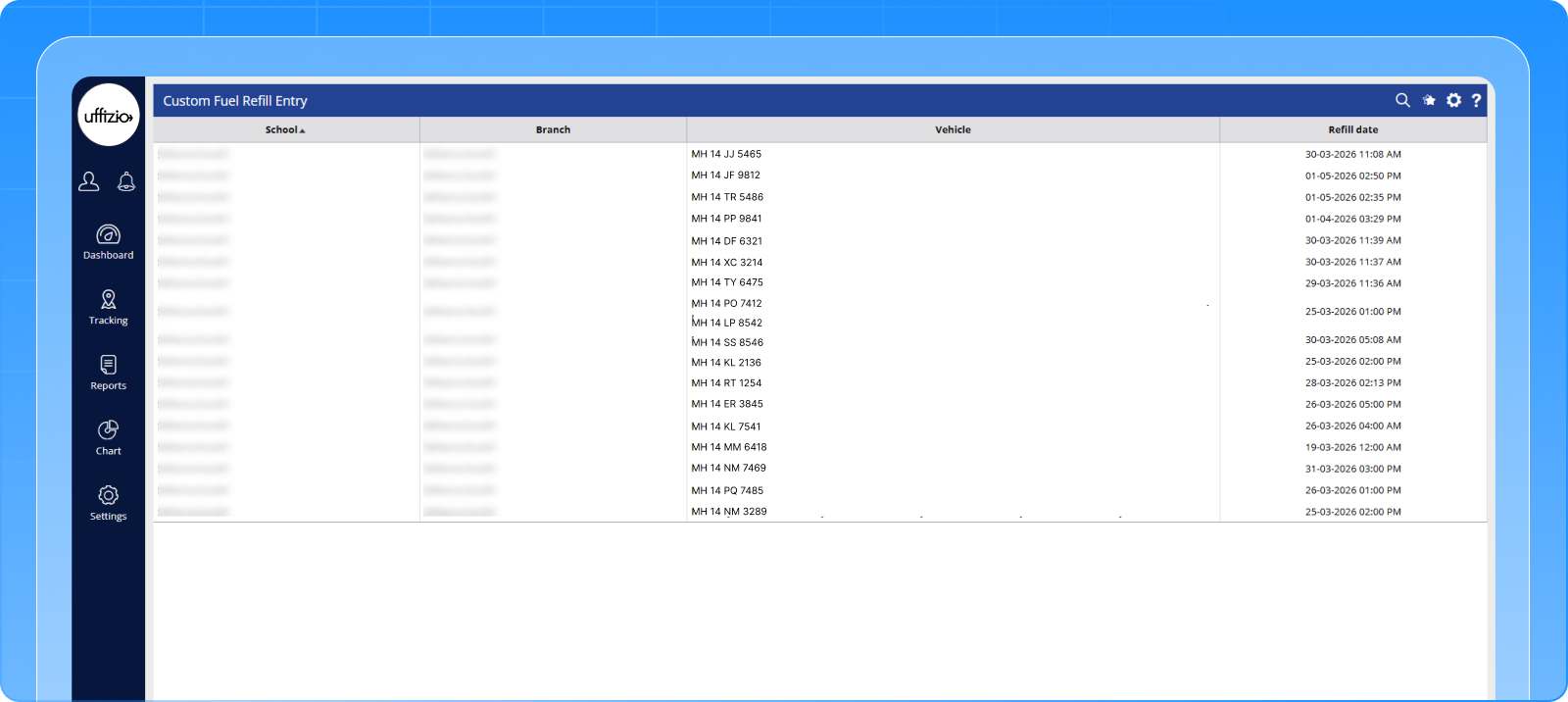
The Feature
SmartBus now introduces a dedicated Fuel Refill Management system.
This includes:
- A new interface to record fuel refill entries for vehicles
- Automatic tracking of the latest and previous refill dates
- System-calculated distance covered between refills
- A detailed vehicle-wise fuel report with filtering and export options
The Benefit
✔ Enables structured fuel tracking for every vehicle
✔ Helps analyze vehicle efficiency and usage patterns
✔ Supports better cost monitoring and operational planning
✔ Reduces dependency on manual record-keeping
Fuel data is no longer scattered; it is now organized, trackable, and actionable.
2.3 Route Optimization with Gender-Based Trip Planning (Safer & Smarter Routing)
The Challenge
Route optimization has always focused on efficiency, but not all operational needs are purely logistical.
Many institutions require separate transport arrangements based on gender, especially for safety and policy compliance.
Previously, this required manual planning outside the system.
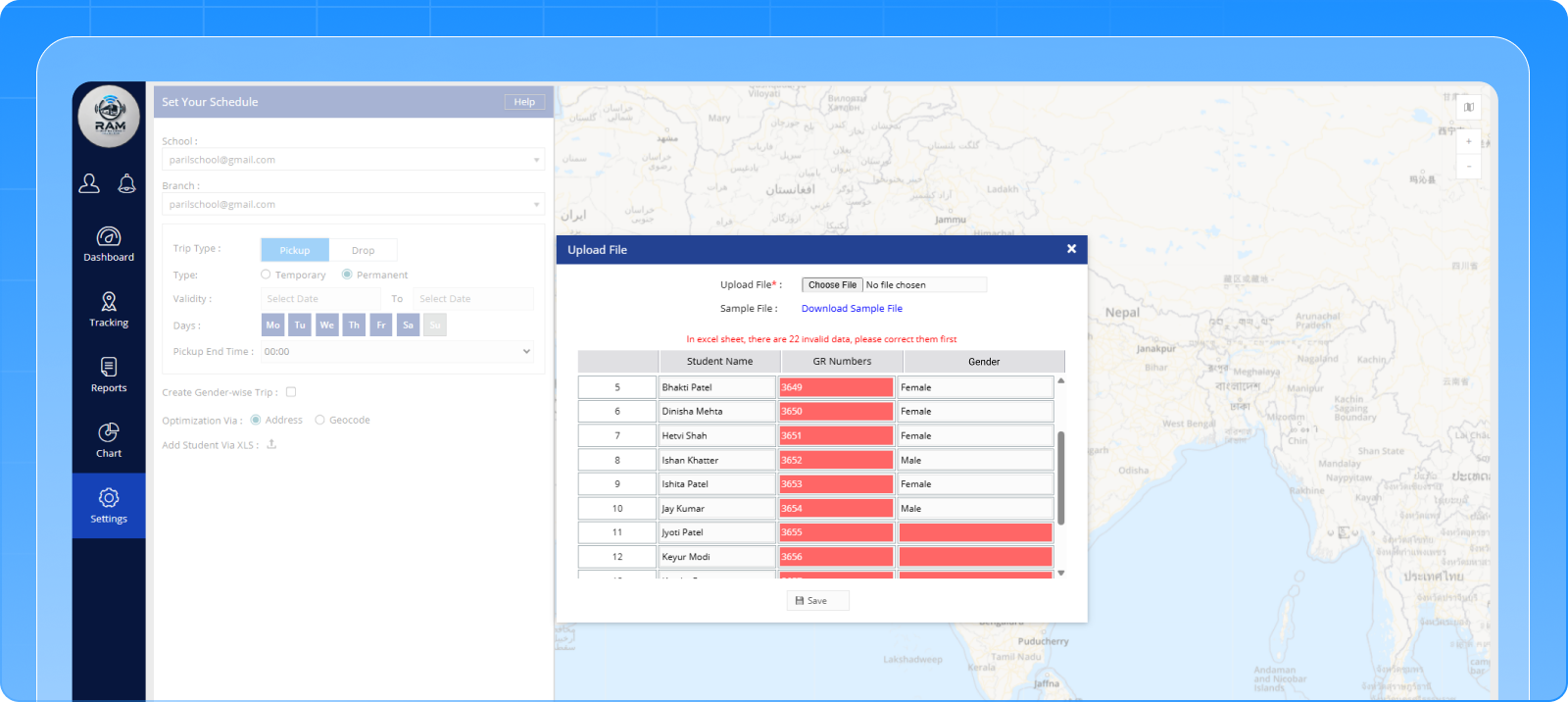
The Feature
Route optimization now supports gender-based trip creation.
When enabled:
- Students are categorized based on gender during data upload
- The system automatically creates separate optimized trips for each group
- Routes are calculated independently for better efficiency
- Student locations are visually differentiated on the map for clarity
Additionally, the system now:
- Automatically plots the school branch location on the map
- Set it as the default start and end point for route planning
The Benefit
✔ Supports gender-specific transport policies
✔ Improves safety and compliance
✔ Reduces manual planning effort
✔ Enhances route visualization and planning accuracy
Route optimization is now not just efficient, it is context-aware and policy-driven.
2.4 Parent Notification Report Enhancement (Full Visibility into Alert Settings)
The Challenge
While notifications were being sent to parents, administrators lacked clarity on:
- Which notifications were assigned
- Whether they were enabled or disabled
- Who modified the settings
This made it difficult to audit or troubleshoot communication gaps.
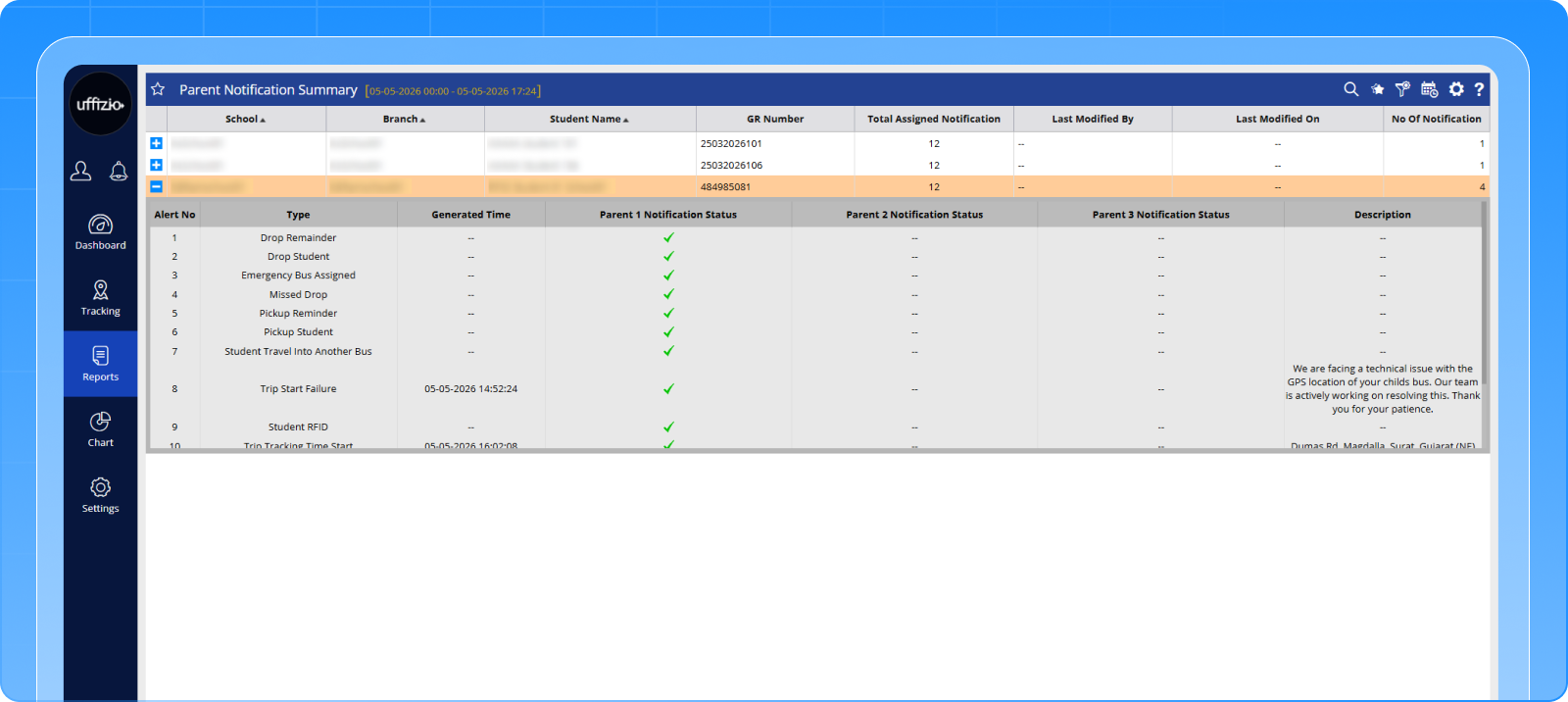
The Feature
The Parent Notification Report has been enhanced to provide deeper visibility and control.
New capabilities include:
- Viewing total assigned notifications per student
- Tracking parent-wise notification status (enabled/disabled)
- Identifying who last modified notification settings and when
- Detailed visibility across multiple registered parents per student
All enhancements are available in both summary and detailed report views.
The Benefit
✔ Improves transparency in parent communication
✔ Helps quickly identify disabled or missed notifications
✔ Enables better audit and tracking of changes
✔ Strengthens communication reliability
Notifications are no longer a black box; they are now fully visible and trackable.
2.5 Student Trip Information Report Enhancement (Complete Trip Visibility in One Place)
The Challenge
The existing Student Trip Information Report lacked key operational details, forcing administrators to rely on multiple screens.
Important information such as:
- Schedule validity
- Trip timing windows
- Vehicle assignments
- Active days
was either missing or not clearly structured.
The Feature
The report has been significantly enhanced to provide a complete, structured view of student trip data.
Key improvements include:
- Addition of operational fields like schedule type, validity dates, and active days
- Clear time window format (From–To) for better understanding of pickup schedules
- Structured detail view with vehicle, timing, and schedule breakdown
- Improved filtering and export capabilities for easier analysis
- Removal of sensitive data fields to ensure data privacy compliance
The Benefit
✔ Provides a complete view of student transport in a single report
✔ Reduces dependency on multiple systems/screens
✔ Improves clarity in schedule and trip understanding
✔ Enhances data security and compliance
The report is no longer just informational; it is now a complete operational reference.
2.6 Video Telematics Integrated into Live Tracking (Unified Monitoring Experience)
The Challenge
Video telematics was available, but not where users expected it.
It existed in a separate panel, and not on the same tab-based structure as the vehicle list. This meant:
- Extra navigation
- Fragmented monitoring experience
- Reduced usability during real-time operations
For something as critical as live video, accessibility matters.
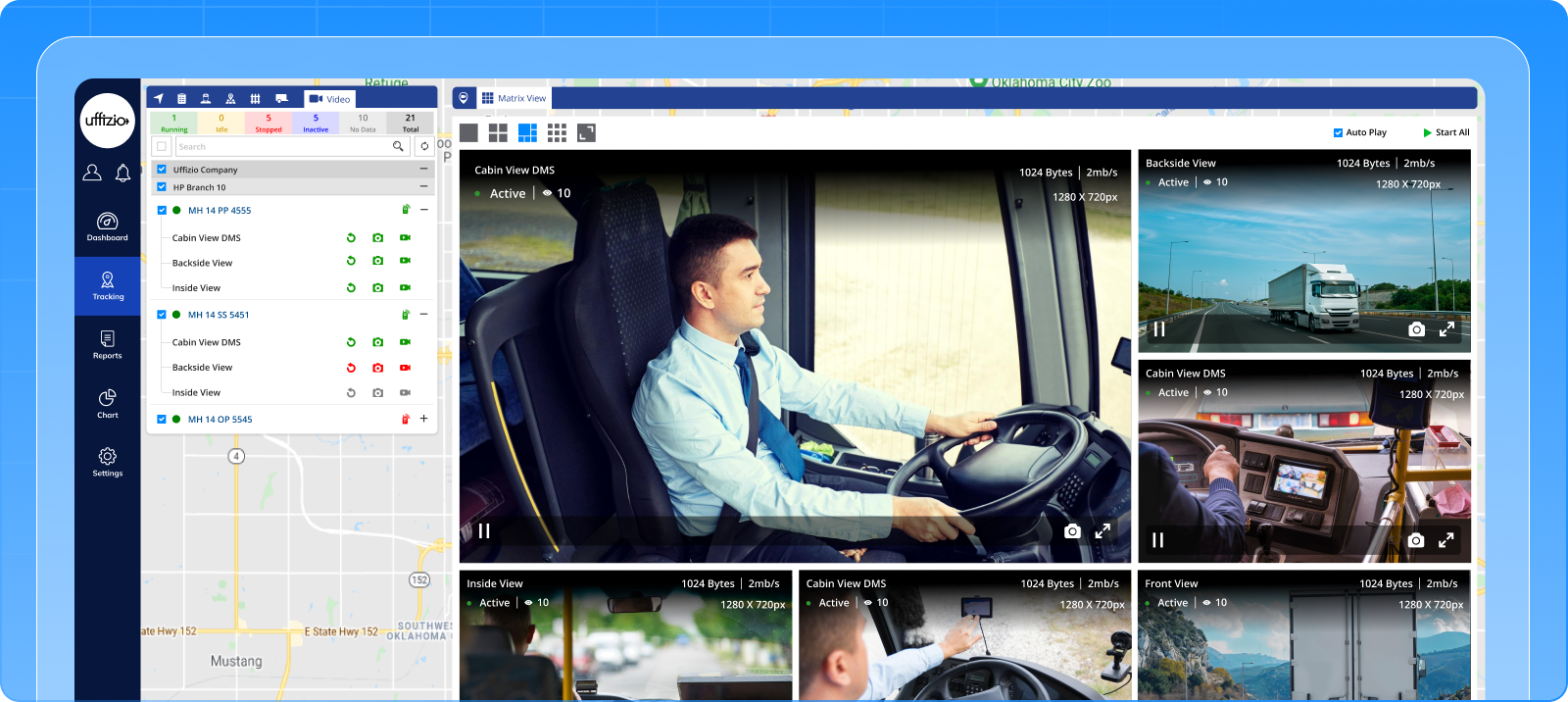
The Feature
Video telematics is now fully integrated into the Live Tracking module through a dedicated “Video” tab.
Within this tab, users can:
- View all video-enabled vehicles in a structured list
- Select camera channels per vehicle
- Access actions like live streaming, playback, snapshot, and intercom
Once streaming is initiated, a dynamic panel opens with:
- Map + Video view for combined tracking and visual monitoring
- Matrix view for multi-camera layouts and simultaneous feeds
The Benefit
✔ Brings video and tracking into a single unified interface
✔ Reduces navigation time during critical monitoring
✔ Improves real-time decision-making
✔ Enhances visibility across vehicles and routes
Video telematics is no longer a separate tab; it is now fully embedded into live operations.
2.7 Student Journey Violation Report (Transport Compliance Monitoring)
The Challenge
Schools often define limits on how long or how far a student should travel.
However, without a system-driven check, identifying violations becomes manual and inconsistent.
This creates gaps in:
- Student safety monitoring
- Policy enforcement
- Operational transparency
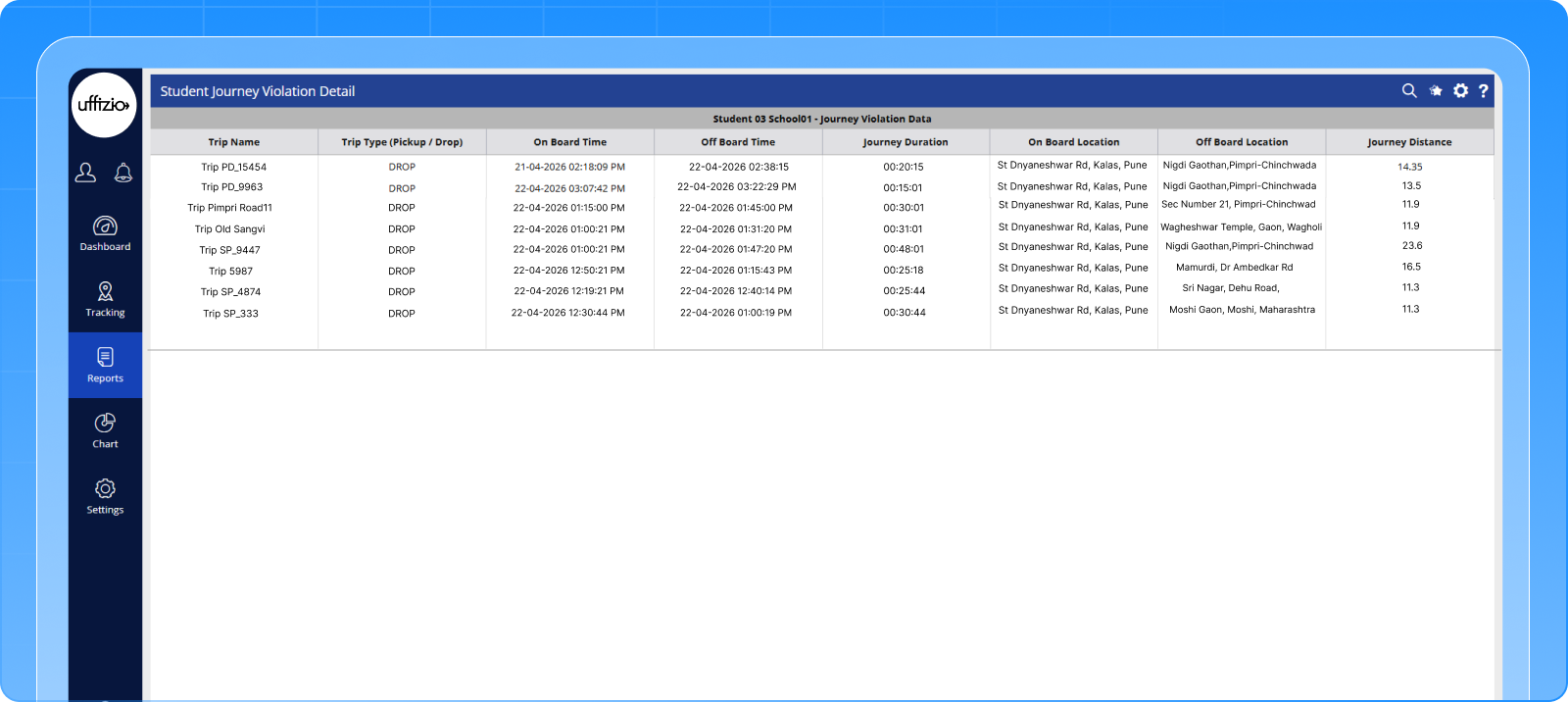
The Feature
A new Student Journey Violation Report has been introduced to track non-compliant trips.
The system now:
- Calculates journey duration and distance for each student
- Flags trips that exceed defined thresholds
- Allows filtering based on time or distance violations
- Provides both summary and detailed views for analysis
Additionally, a dashboard widget highlights violation counts for quick visibility.
The Benefit
✔ Enables proactive monitoring of student travel conditions
✔ Supports safety and policy compliance
✔ Reduces manual effort in identifying violations
✔ Provides actionable insights for route optimization
Compliance is no longer reactive; it is now continuously monitored and measurable.
2.8 Multi-School Parent App Experience (Clear, Context-Aware Access)
The Challenge
Some parents have children studying in different schools.
Previously, the Parent App merged all data into a single view, leading to:
- Confusion in tracking and notifications
- Incorrect application of school-specific rules
- Lack of clarity on which school data was being viewed
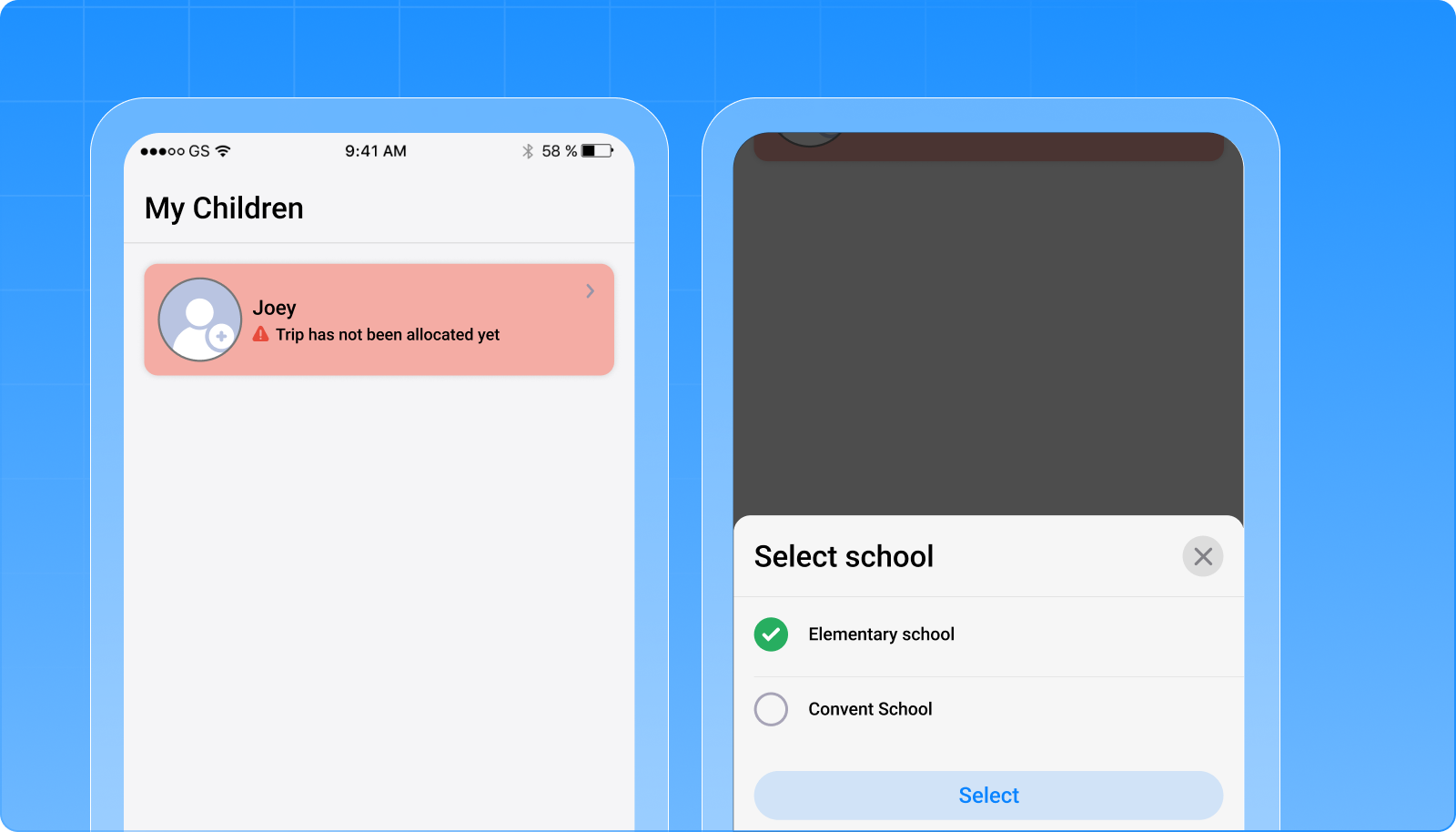
The Feature
The Parent App now supports a school-wise experience for multi-school parents.
Key enhancements include:
- A school selection screen after login
- Ability to switch between schools seamlessly within the app
- Automatic loading of school-specific data, rules, and views
- Smart redirection when opening notifications or announcements
Despite this separation, core settings like password and language remain unified for convenience.
The Benefit
✔ Eliminates confusion for multi-school parents
✔ Ensures accurate data and rule application
✔ Improves navigation and user clarity
✔ Maintains convenience with shared settings
The Parent App is now context-aware, adapting seamlessly to each school.
2.9 Trip Distance Breakdown in Reports (Granular Route Visibility)
The Challenge
Trip reports previously showed only the total planned distance.
This made it difficult to understand:
- Distance between individual stops
- Route-level efficiency
- Segment-wise analysis
For operational teams, this level of detail is essential.
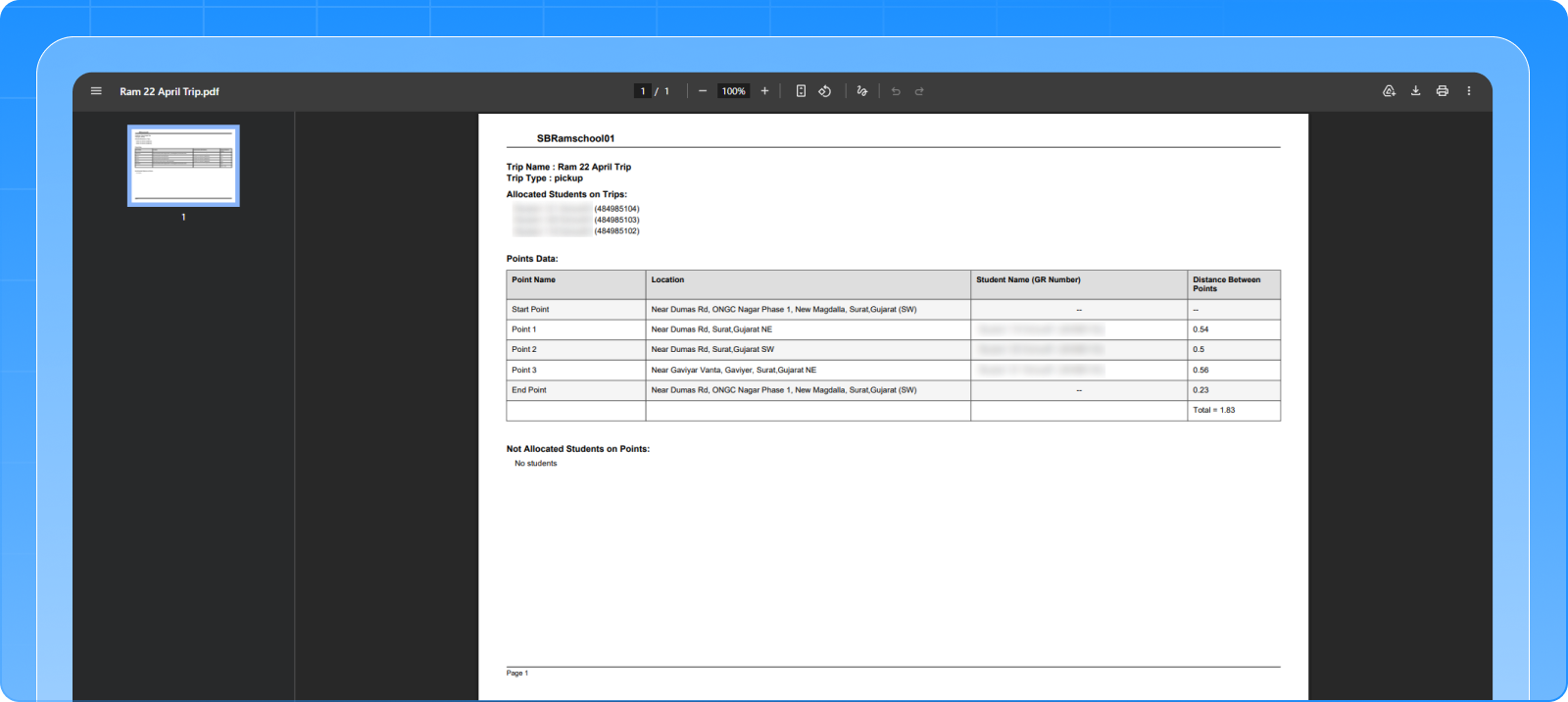
The Feature
Trip data exports now include a new column: “Distance Between Points”.
The system:
- Calculates the distance between every consecutive checkpoint
- Displays segment-wise distance across the route
- Retains total trip distance for overall reference
This enhancement is available in both PDF and XLS exports.
The Benefit
✔ Provides detailed route-level visibility
✔ Supports better planning and optimization
✔ Helps identify inefficiencies between stops
✔ Improves reporting clarity
Trip data is no longer just summarized; it is now fully broken down and analyzable.
2.10 School Gate Attendance & Tracking System (Beyond Vehicle-Based Monitoring)
The Challenge
Attendance tracking was limited to vehicle-based systems.
This meant:
- No visibility of students entering/exiting school premises independently
- Gaps in attendance tracking outside trips
- Limited validation of actual student presence on campus
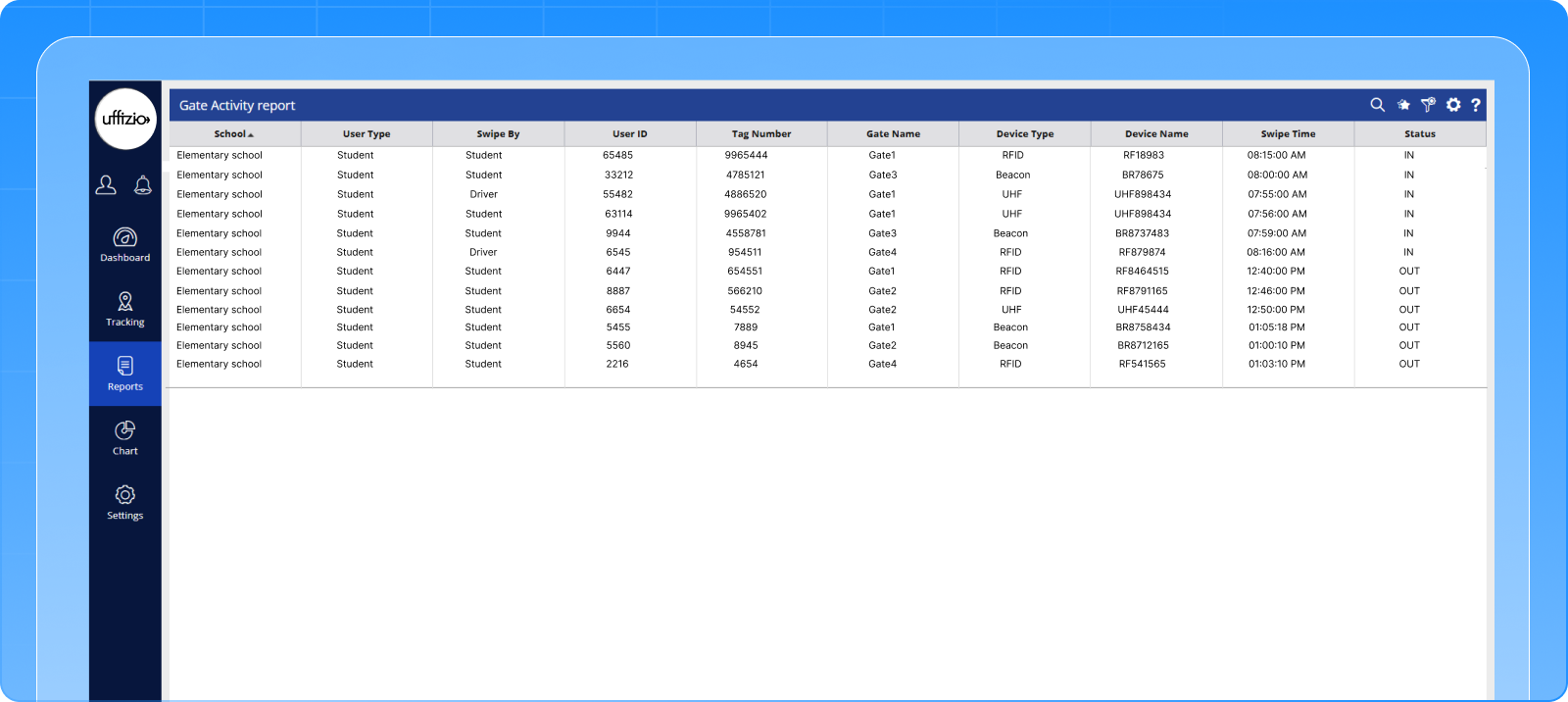
The Feature
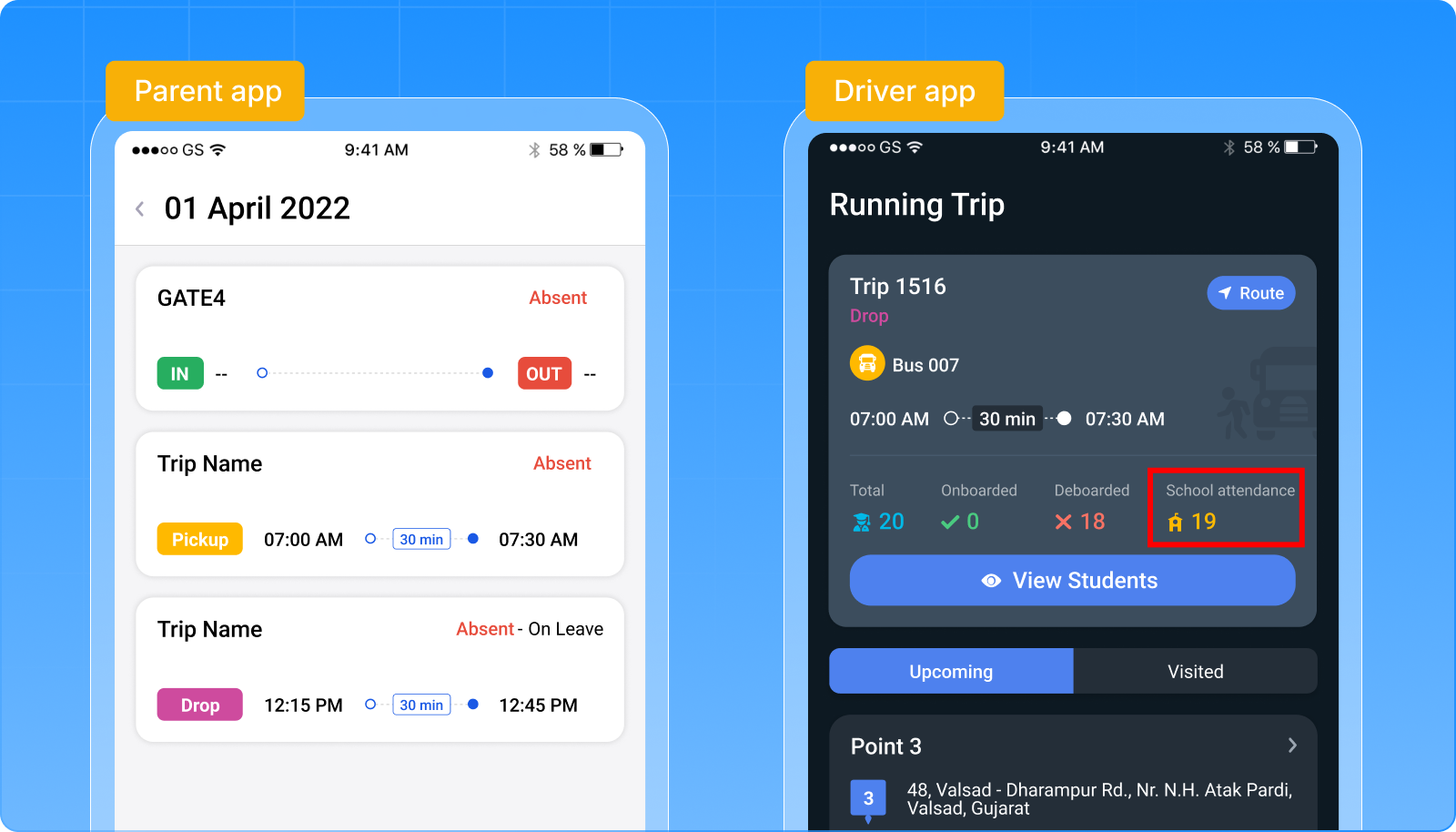
A comprehensive School Gate Attendance system has been introduced using RFID, UHF, and Beacon devices.
The system enables:
- Automatic IN/OUT tracking at school gates
- Centralized gate configuration and device management
- Real-time gate swipe alerts for students and drivers
- A dedicated Gate Activity Report for complete visibility
This functionality extends across:
- Driver App – showing gate-based student presence
- Parent App – combining trip and gate attendance
- Reports – unified attendance and swipe logs
The Benefit
✔ Extends tracking beyond vehicles to campus entry/exit
✔ Provides accurate student presence validation
✔ Improves safety and monitoring
✔ Reduces dependency on manual attendance systems
Tracking is no longer limited to trips; it now covers the entire school journey.
2.11 Weather Insights in Parent App (Contextual Travel Awareness)
The Challenge
Parents rely on multiple apps to check weather conditions before or during trips.
This creates a disconnected experience, especially when the weather directly impacts travel.
The Feature
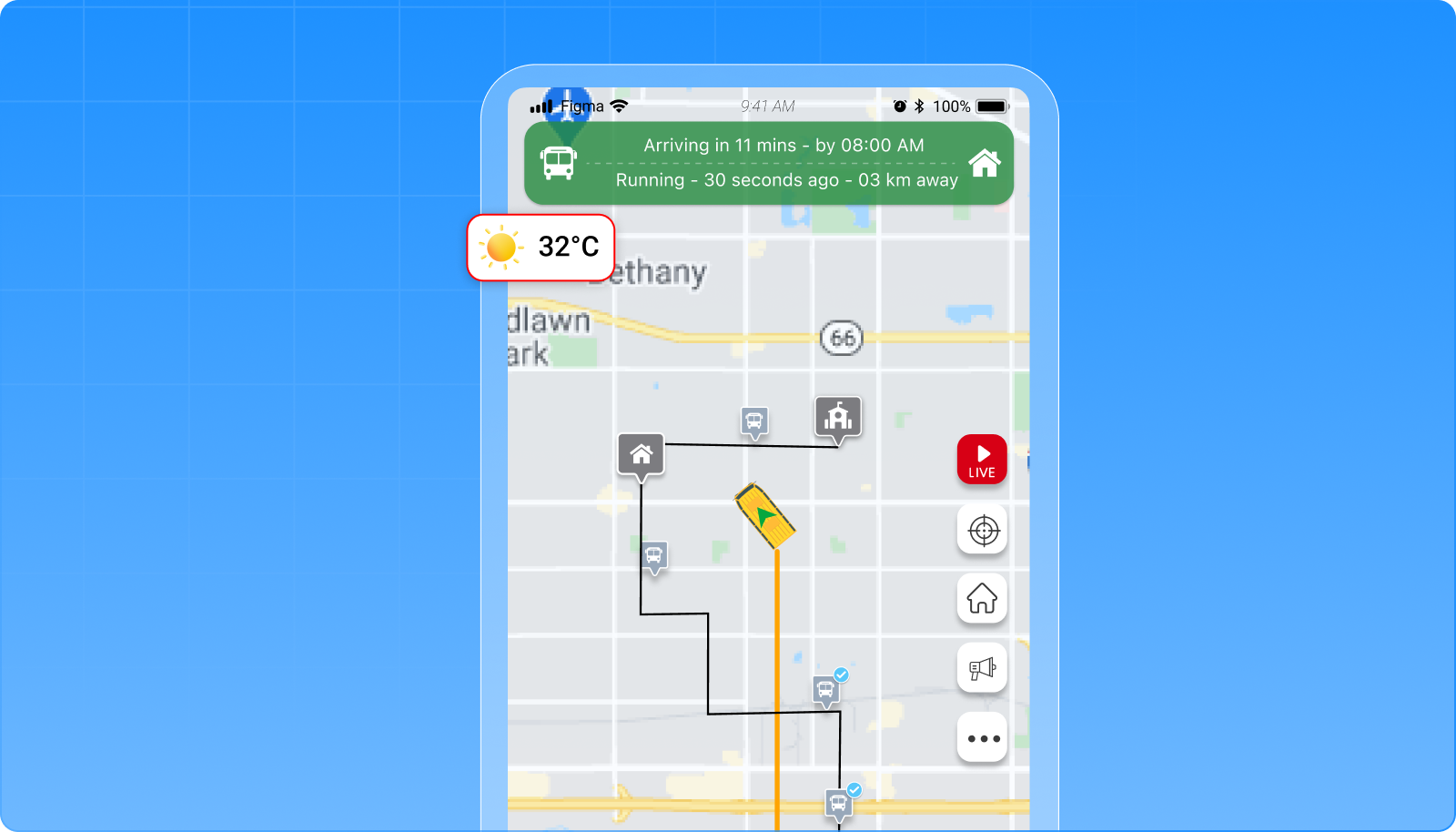
The Parent App now displays real-time weather information within the tracking interface.
Parents can:
- View temperature and weather conditions at their child’s location
- Enable or disable the feature via app settings
- Access weather data directly from the live tracking screen
The feature is controlled at the school level, ensuring flexibility in deployment.
The Benefit
✔ Provides contextual travel information within the app
✔ Eliminates the need for external weather apps
✔ Enhances overall parent experience
✔ Supports better preparedness for daily travel
Tracking is now not just about location; it includes environmental context as well.
3. SmartTranzit (Public Transport) Updates
3.1 Configurable Waypoint ETA (Flexible Route Planning)
The Challenge
Waypoint ETA was mandatory for all routes, even when precise estimates were unavailable.
This created friction in route configuration and limited flexibility.
The Feature
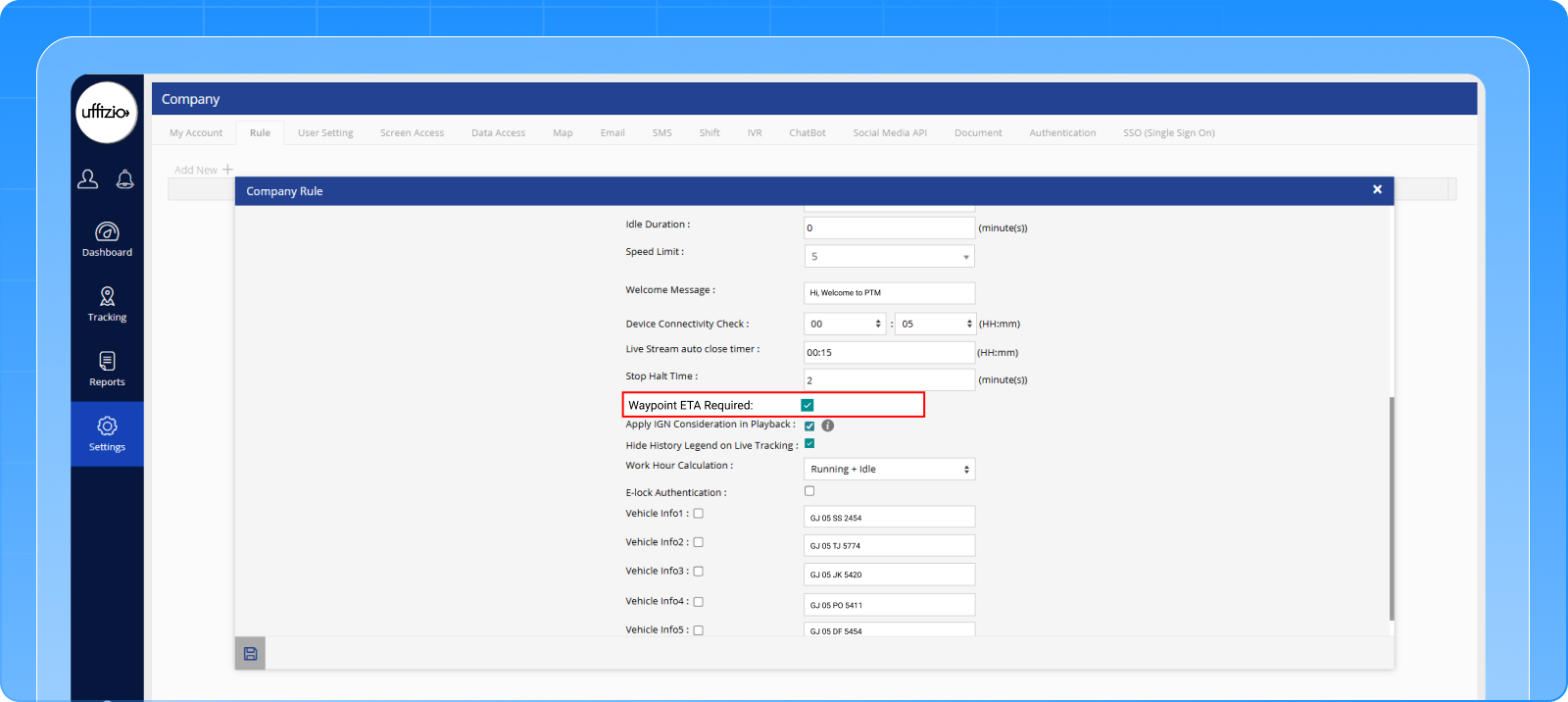
A new company-level setting allows Waypoint ETA to be optional or mandatory.
When optional:
- Routes can be created without entering ETA for every waypoint
- The system automatically calculates ETA using historical trip data
- Consistent ETA is still ensured for end users
The Benefit
✔ Provides flexibility in route configuration
✔ Reduces dependency on manual data entry
✔ Maintains ETA visibility through system intelligence
✔ Ensures no disruption to existing workflows
Route planning is now more flexible without compromising user experience.
3.2 Driver Halt Time Violation Report (Driver Behavior Monitoring)
The Challenge
There was no structured way to monitor whether drivers were exceeding halt times at stops.
This made it difficult to:
- Identify inefficiencies
- Track delays
- Enforce operational discipline
The Feature
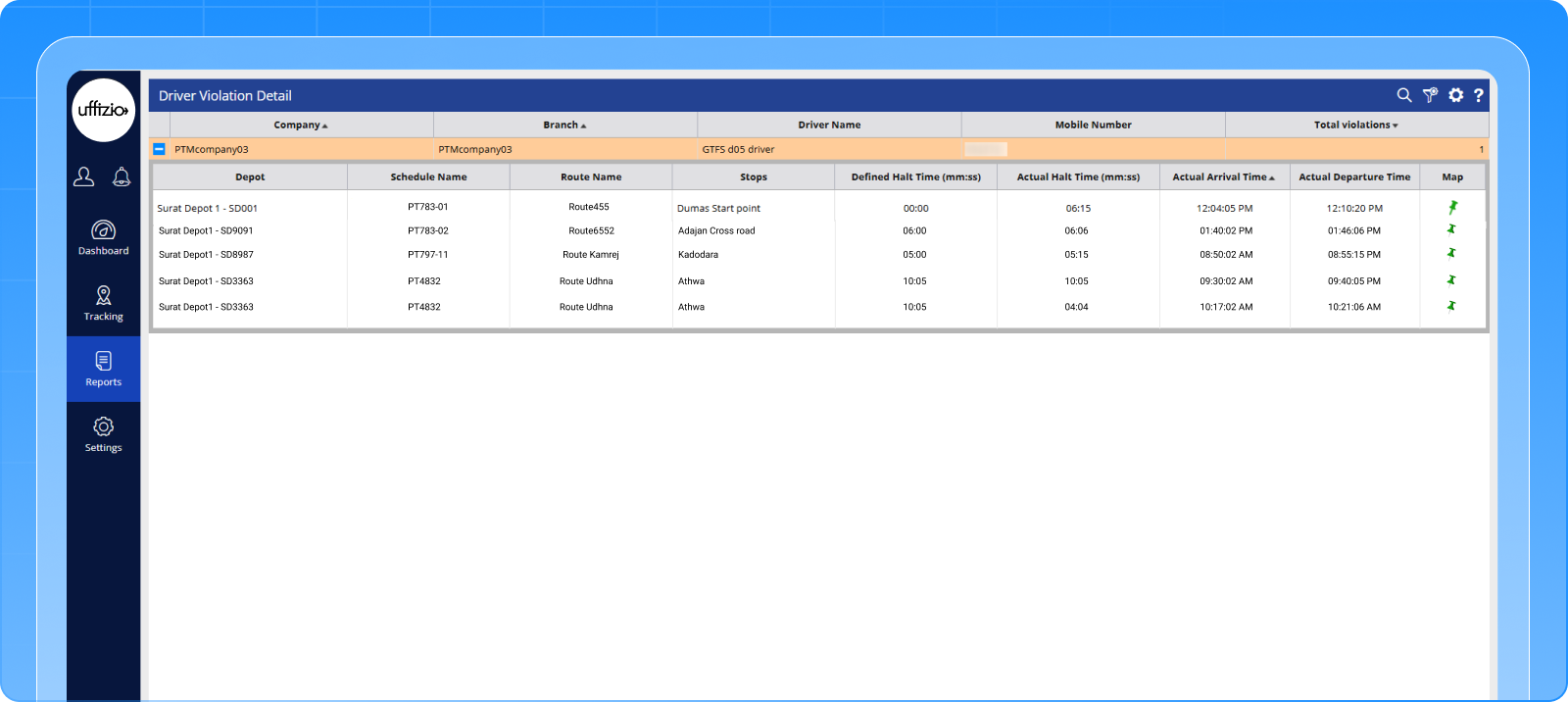
A new Driver Violation Report has been introduced based on halt time monitoring.
The system:
- Defines the default halt time at the company level
- Compares actual vs allowed halt duration
- Flags violations when limits are exceeded
- Provides detailed reporting for analysis
The Benefit
✔ Improves driver accountability
✔ Helps identify operational delays
✔ Supports performance monitoring
✔ Enables better schedule adherence
Driver behavior is no longer assumed; it is now measured and trackable.
Conclusion
With improvements across tracking workflows, reporting, and user experience, the April release strengthens the platform’s ability to support day-to-day transport operations with greater clarity and control.
Key outcomes include:
- More seamless monitoring through improved Live Tracking experience
- Extended visibility beyond trips with gate-level attendance tracking
- Stronger compliance oversight through automated violation reporting
- Enhanced user experience across parent and admin interfaces
These updates build on existing capabilities to make the system more intuitive, informative, and operationally reliable, without disrupting established workflows.
For schools, transport operators, and partners, this translates into better visibility, improved coordination, and more confident decision-making in daily operations.