
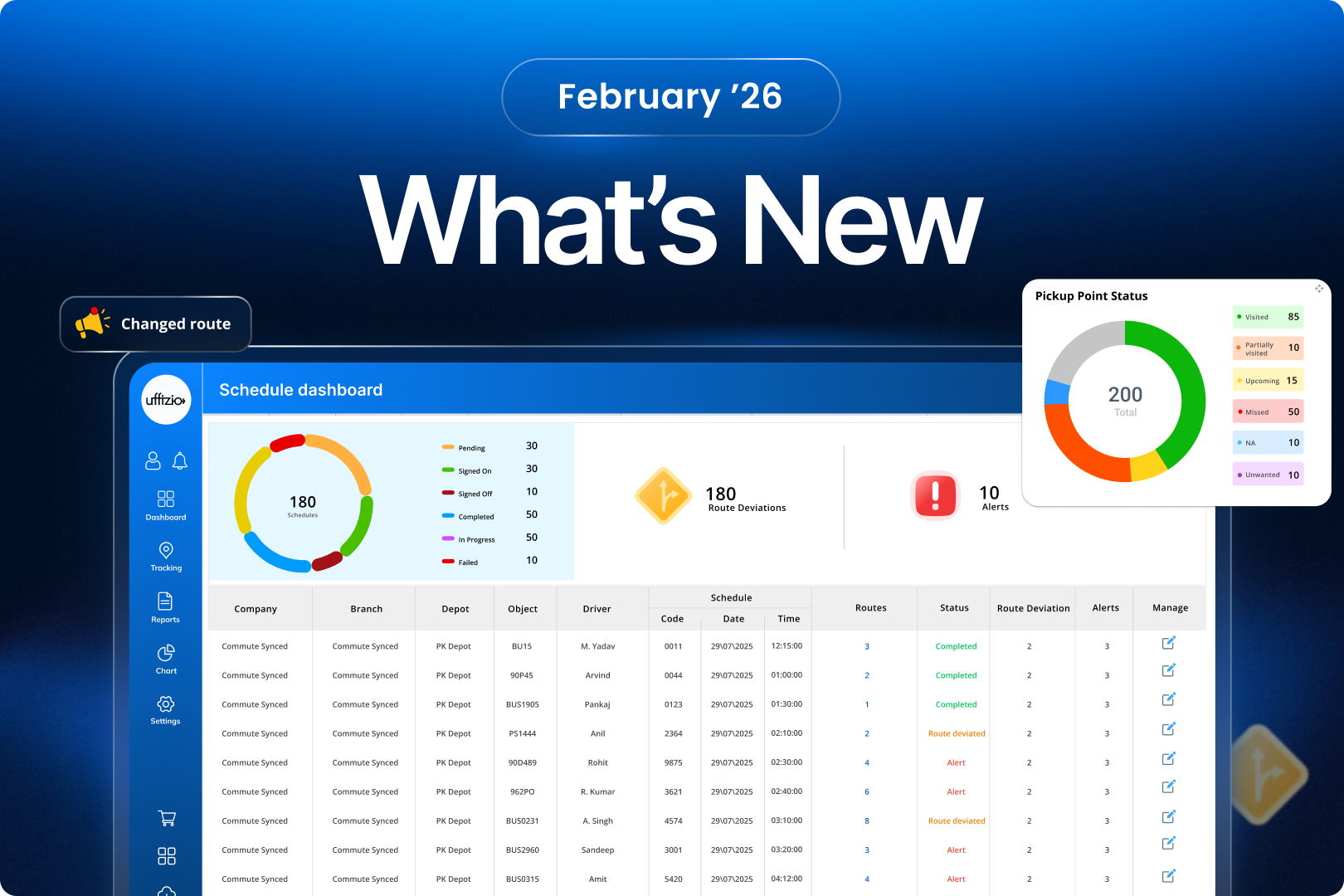
February 2026 brings meaningful operational enhancements across:
- SmartBus
- SmartBus Lite
- SmartTranzit
This month focuses on:
- Real-time safety continuity
- Regulatory enforcement
- Intelligent route automation
- International transport compliance
- Operational governance
Let’s explore what’s new.
1. SmartBus & SmartBus Lite Updates
1.1 Early Pickup & Late Drop Alerts (Regulatory Compliance Ready)
The Challenge
In several regions, especially in the Middle East, there are strict rules:
Students cannot be picked up before a defined time.
Students cannot be dropped after a defined cut-off time.
Without automated validation, schools rely on manual monitoring — which is risky and non-compliant.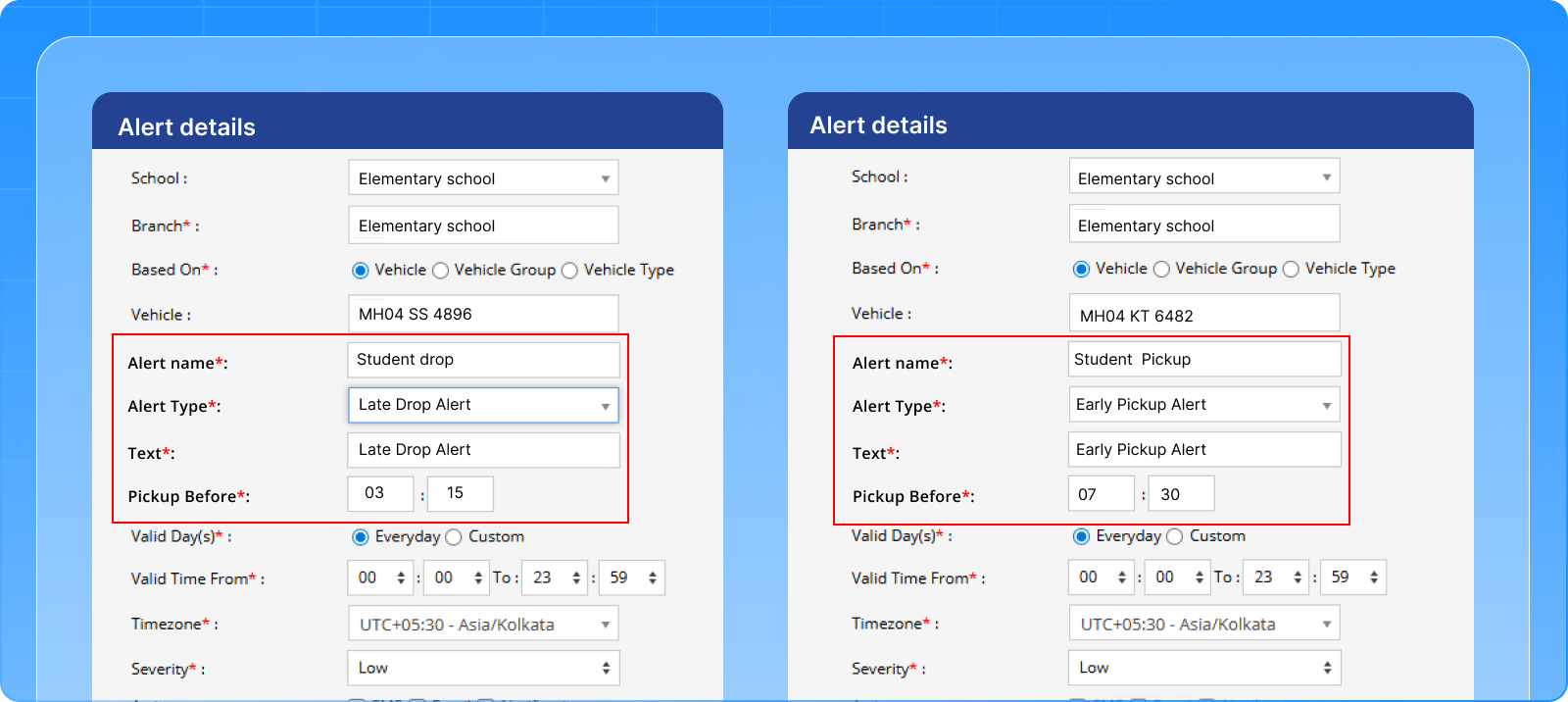
The Feature
We have introduced:
- Early Pickup Alert
- Late Drop-off Alert
Managers can configure:
- “Pickup Before” time
- “Drop After” time
If the timing rule is violated, the system instantly generates an alert with full trip details.
The Benefit
✔ Ensures regulatory compliance
✔ Prevents early/late operational violations
✔ Creates audit-ready logs
✔ Improves accountability
✔ Protects school reputation
Now timing discipline is system-enforced — not manually checked.
1.2 Driver Location Sharing During GPS Failure (Live Tracking Continuity)
The Challenge
Imagine this situation:
The GPS device stops sending data due to:
- Device malfunction
- Network issue
- Power cut
- SIM failure
Suddenly, live tracking disappears.
Parents open the app, and they cannot see the bus.
Calls start coming to the school.
Transport managers panic.
Drivers get flooded with phone calls.
All because tracking stopped.
The Feature
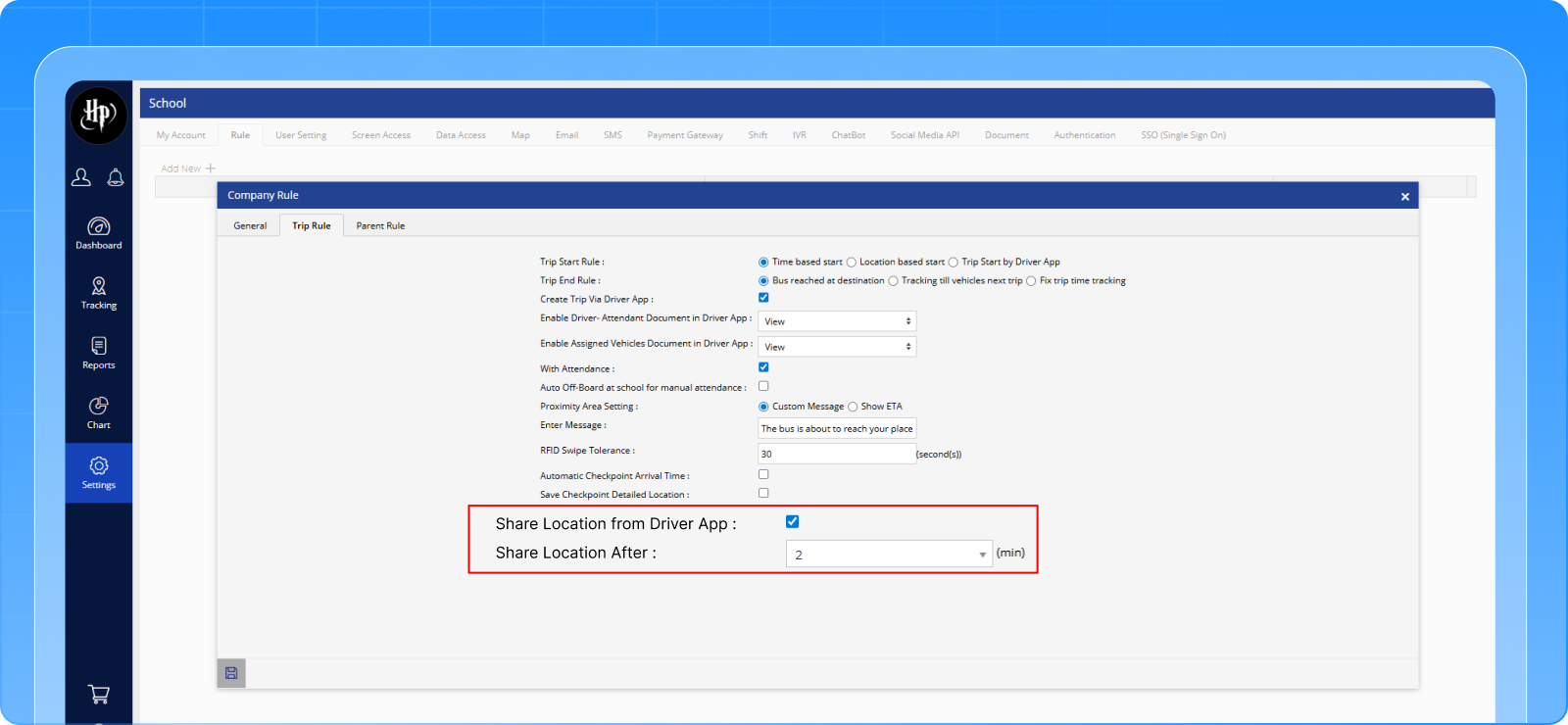
We have built a Driver Location Sharing fallback system inside SmartBus.
When the GPS device becomes inactive:
- The Driver App automatically prompts for location sharing
- The driver’s mobile GPS location is used temporarily
- Live tracking continues in the Parent App
Tracking continuity is maintained, even when hardware fails.
Additionally, schools can control this behavior through Trip Rules if required.
The Benefit
✔ No tracking blackout during device failure
✔ Parents continue to see live bus movement
✔ Reduced panic calls
✔ Stronger safety perception
✔ Hardware-independent backup tracking
This is not just a feature.
It is a safety continuity mechanism that prevents chaos during real-world failures.
Many partners don’t even realize this level of fallback protection exists — but now you do.
1.3 Trip KML Download with Checkpoints & Color Coding
The Challenge
Transport administrators often need to:
- Compare routes in external systems
- Share route proof with the authorities
- Analyze trip playback
- Upload data into tools like Google Earth
Earlier, checkpoint-level clarity inside KML files was limited.
The Feature
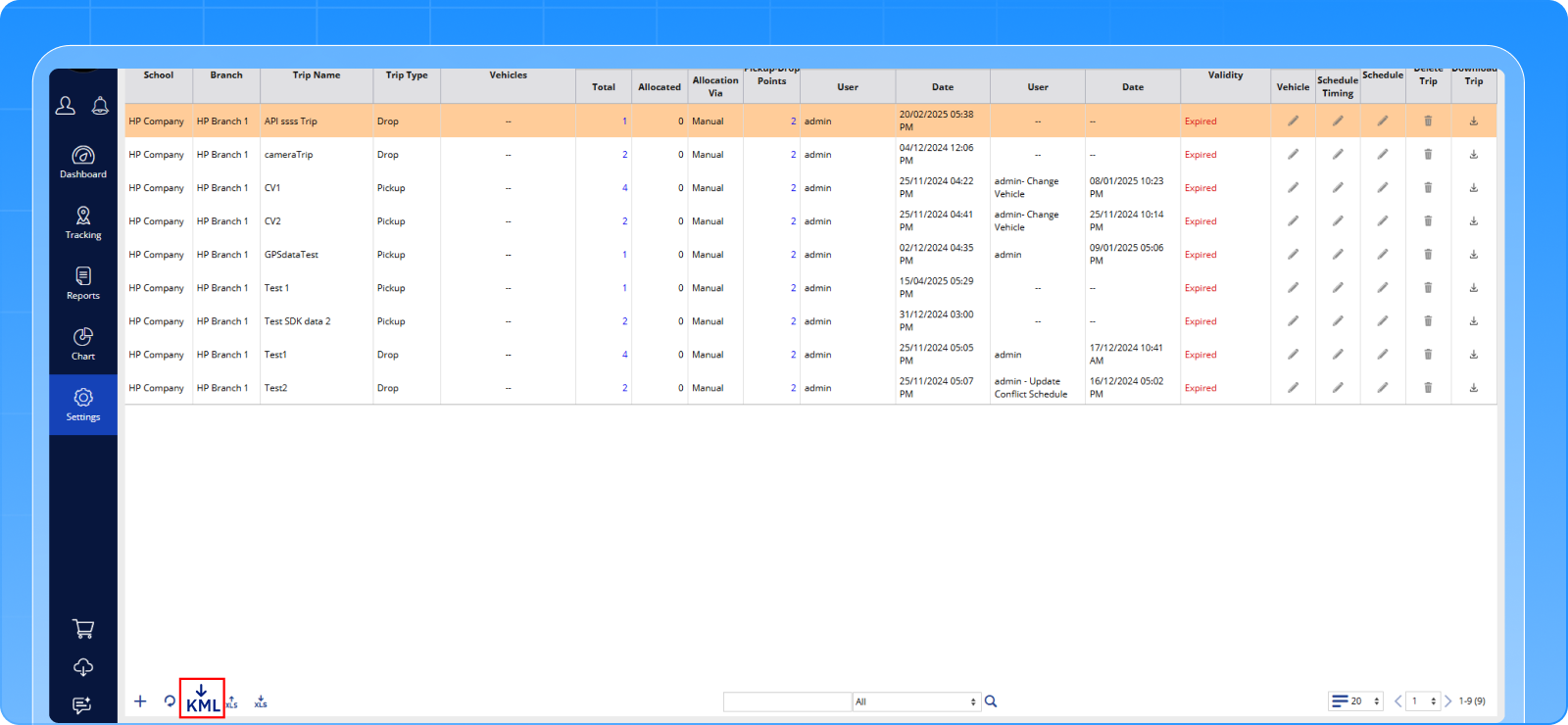
Now users can:
- Select specific trips (multi-select dropdown)
- Download only chosen trips
- View:
- Start point
- All checkpoints
- End point
- Complete route path
Each trip appears in a unique color for visual clarity.
The Benefit
✔ Easy external comparison
✔ Clean compliance documentation
✔ Better route auditing
✔ Presentation-ready trip visuals
✔ No performance impact
Now your trip data becomes visually actionable.
1.4 Not Applicable Checkpoints (Auto Route Intelligence)
The Challenge
Consider this situation:
A trip has 10 checkpoints.
At one specific checkpoint, all students are on leave for the day.
Traditionally, that stop would still remain part of the trip, even though no pickup or drop was required.
This means:
- The driver still follows the same fixed route
- Time is spent covering an unnecessary stop
- Fuel is consumed without purpose
- Admin teams may need to manually adjust the trip
Operationally, this creates inefficiency.
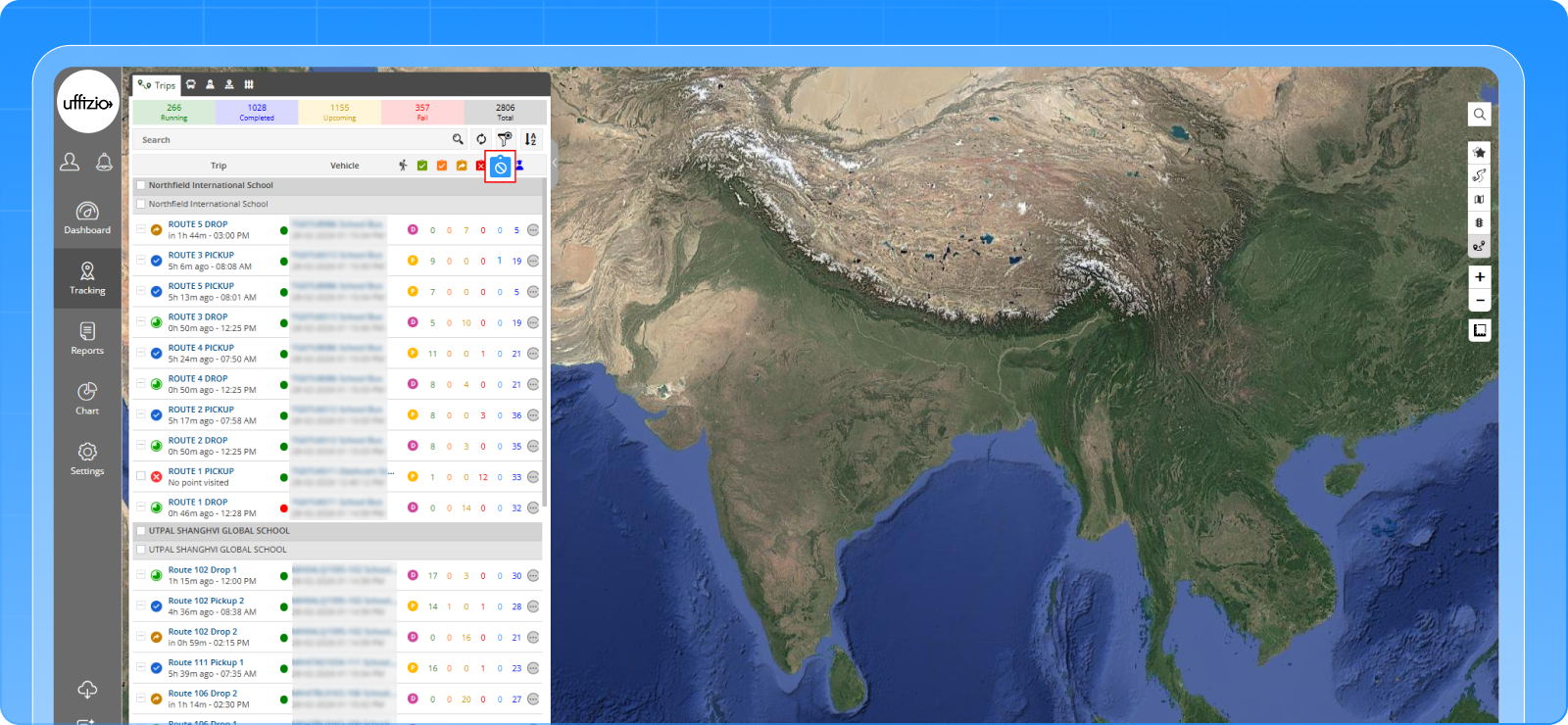
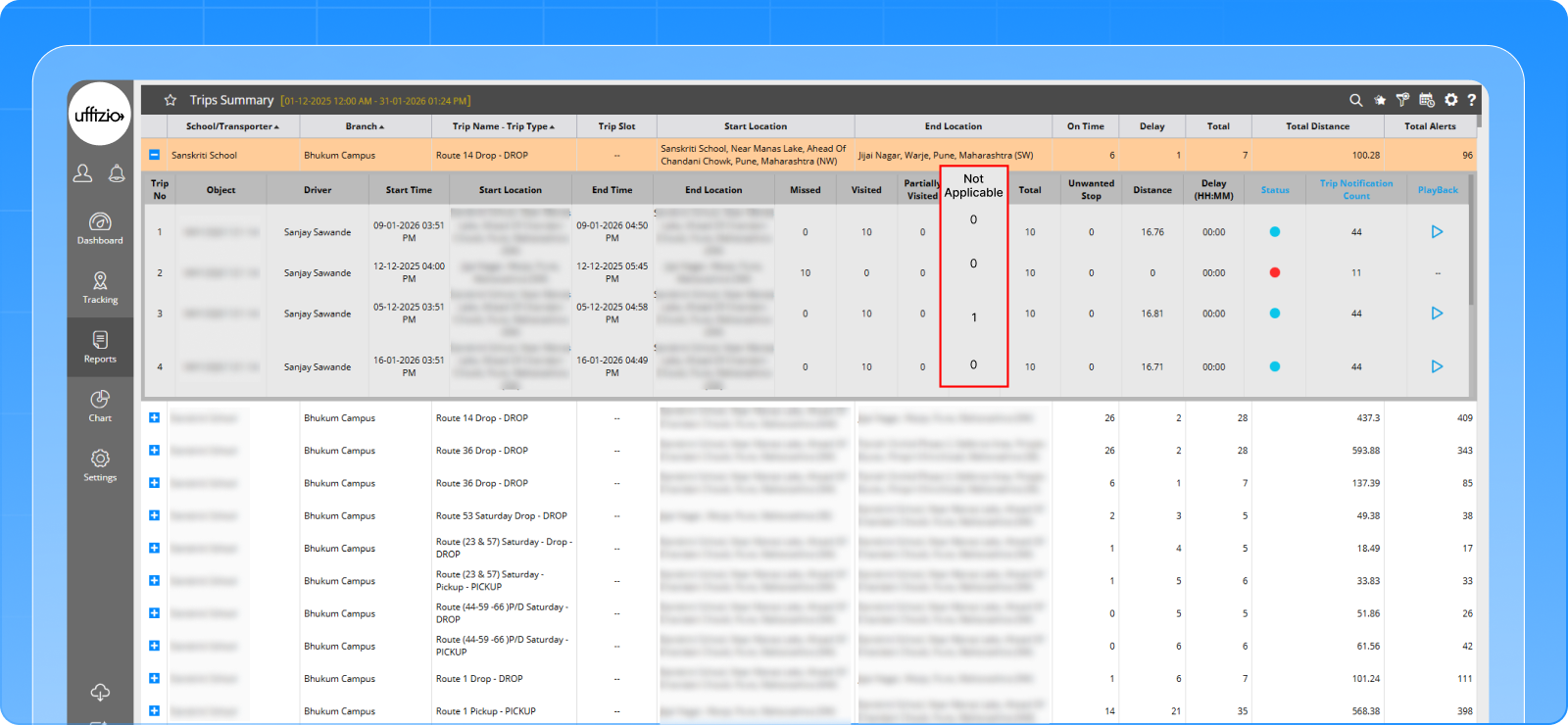
The Feature
We introduced intelligent Not Applicable checkpoint logic.
If at a particular checkpoint all students are on leave:
- That specific checkpoint is automatically removed from the trip for that day only
- The driver app does not display that point
- The route is automatically optimized
- In the admin panel, the checkpoint is clearly marked as Not Applicable (not missed)
No manual edits are required.
From the next day onwards, when students are present, the trip automatically returns to its original structure.
The Benefit
✔ Daily route optimization
✔ Saves unnecessary kilometers
✔ Reduces fuel consumption
✔ Saves driver time
✔ No manual trip modification by admin
✔ Clear visibility that the stop was “Not Applicable”
✔ Automatic restoration next day
Now SmartBus doesn’t just track routes, it intelligently adapts them based on real attendance.
1.5 Announcement Module Enabled in SmartBus Lite
The Challenge
SmartBus Lite users did not have a structured communication module for parent notifications.
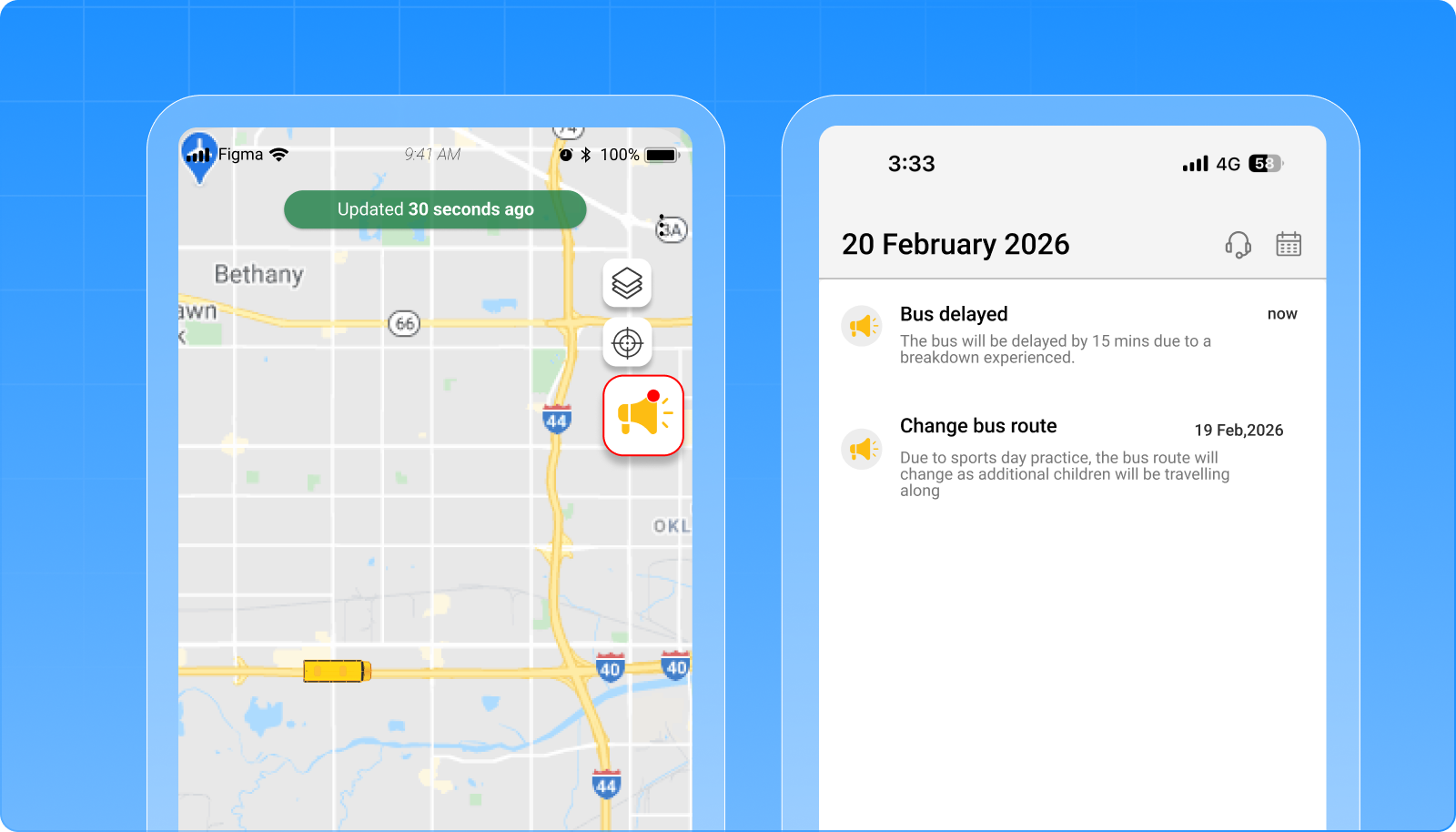
The Feature
Announcement module is now fully enabled in SmartBus Lite:
- Create announcements via Web or Manager App
- Send to Admin, School, or Students
- Vehicle-based student selection
- Parent App announcement screen
- Announcement Report enabled
Notification-only delivery keeps it simple and fast.
The Benefit
✔ Direct communication with parents
✔ Targeted vehicle-level announcements
✔ Centralized message control
✔ Improved coordination
✔ No third-party tools required
SmartBus Lite now offers structured communication — not just tracking.
2. SmartTranzit – Public Transportation Enhancements
2.1 Driver Duty & Shift Configuration (Workforce Governance Upgrade)
The Challenge
In public transportation, driver management is not just about assigning a vehicle.
Authorities must manage:
- Duty IDs
- AM / PM shifts
- Block numbers
- Sign-on and sign-off timings
- Service-day applicability
- Validity periods
Without structured duty planning:
- Driver allocation becomes manual
- Shift conflicts occur
- Tracking accountability becomes weak
- Operational audits become difficult
Workforce governance cannot rely on spreadsheets.
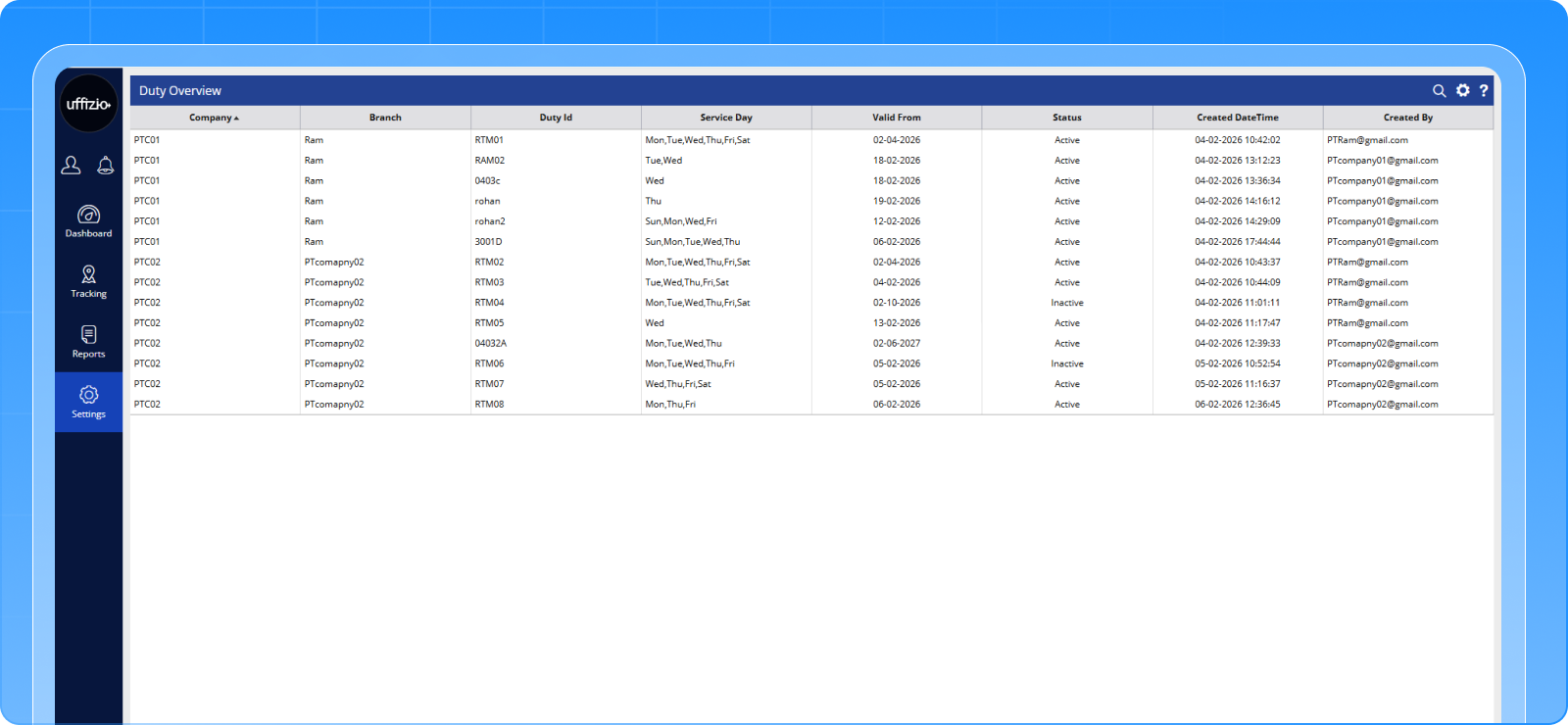
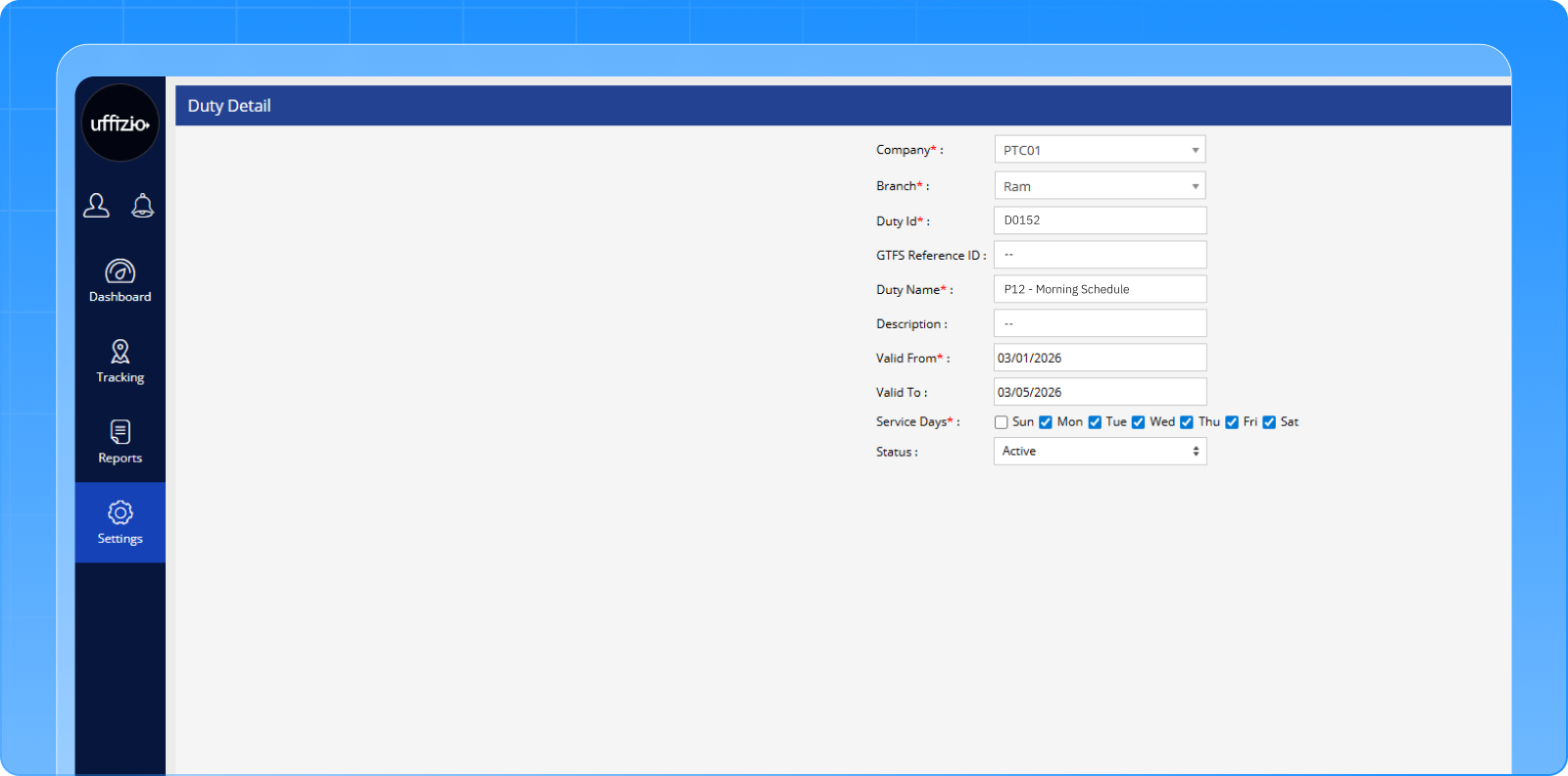
The Feature
SmartTranzit now includes a complete Duty & Shift Configuration Module.
Authorities can:
- Create predefined Duty IDs
- Configure Shift types (AM / PM / Night)
- Define Block numbers
- Set Sign-on and Sign-off timings
- Map service days (Sunday–Saturday)
- Define validity periods
- Control lifecycle (Active / Inactive)
- Enforce role-based access
- Maintain full audit logs
Duty and Shift can now be assigned directly during vehicle and driver allocation.
Everything is structured. Nothing is ad hoc.
The Benefit
✔ Structured driver workforce governance
✔ Clear shift accountability
✔ Reduced allocation conflicts
✔ Audit-ready operational logs
✔ Better compliance control
✔ Improved resource planning
Now driver operations are managed through a defined system — not manual coordination.
2.2 Static GTFS Integration (Mandatory Public Transport Compliance)
The Challenge
For modern public transport systems, GTFS compliance is no longer optional.
Across many countries, authorities mandate integration with
General Transit Feed Specification standards.
Without GTFS alignment:
- Route data cannot be standardized
- Service-day planning lacks structure
- Integration with journey planners becomes difficult
- Authority approvals get delayed
GTFS is now a baseline requirement for public transport operations.
The Feature
SmartTranzit is now integrated with Static GTFS structure.
The system supports:
- GTFS-based route and service configuration
- Service-day pattern alignment
- GTFS reference ID mapping
- Duty boards structured around GTFS releases
- Validity-based lifecycle management
When a new GTFS file is released, duty and operational planning can align accordingly.
This ensures SmartTranzit follows the same structural framework required by public transport authorities.
The Benefit
✔ Mandatory compliance readiness
✔ Standardized route and service configuration
✔ Easier authority approvals
✔ Structured planning aligned with official GTFS data
✔ Future-ready architecture for further GTFS expansion
SmartTranzit now meets the fundamental GTFS compliance expectations required in modern public transportation ecosystems.
2.3 Unified Operational Dashboard (Complete Route-Level Command Center)
The Challenge
In public transportation, operations are dynamic.
Controllers need to see:
- Which routes are running
- Which vehicles are assigned
- Which drivers are on duty
- Route deviations
- Alerts
- Schedule status
When information is fragmented or available only at schedule level, decision-making becomes slower.
Transport authorities need one powerful operational screen — not multiple scattered views.
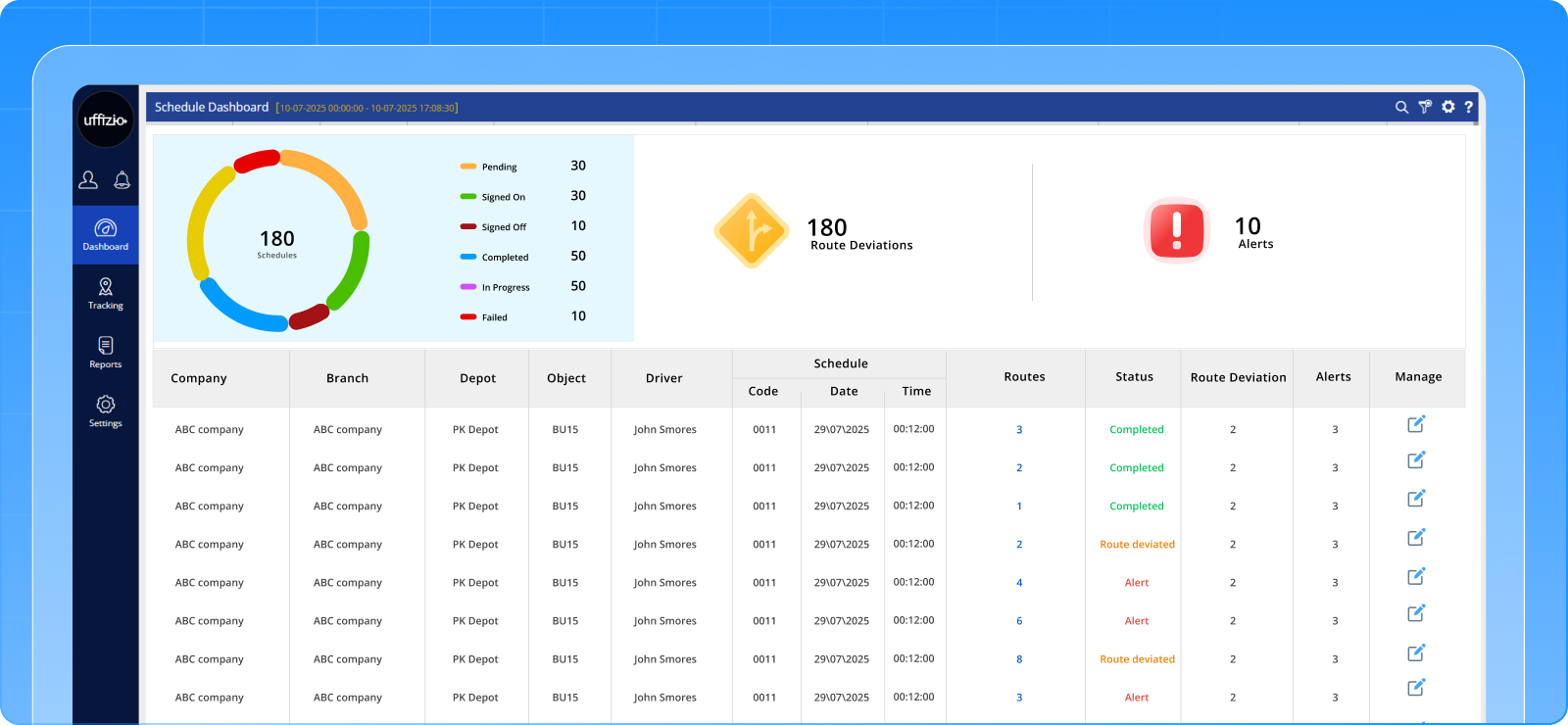
The Feature
SmartTranzit now delivers a single, unified Operational Dashboard designed as a real-time command center.
From one screen, authorities can now:
- View status of all routes under every schedule
- See vehicle and driver allocation route-wise
- Manually allocate or modify vehicle and driver assignments
- Assign Duty ID and Shift directly from route detail view
- Track Block numbers and operational mapping
- Monitor route deviations in real time
- View alerts related to specific routes
- Check vehicle count within each schedule
- Open detailed route-level allocation interface instantly
The “Modify” action now opens a powerful route-level management window, enabling real-time operational adjustments.
Everything is centralized. Everything is visible.
The Benefit
✔ Single dashboard for complete operational control
✔ Real-time status of all running routes
✔ Manual allocation flexibility during breakdowns or shift changes
✔ Immediate visibility of alerts and route deviations
✔ Route-wise accountability
✔ Faster decision-making during live operations
✔ Improved resource governance
Now SmartTranzit doesn’t just show schedules — it provides a live operational command center.
Authorities can monitor, allocate, adjust, and control — all from one unified dashboard.
February 2026 Release Summary
This month’s update reinforces three critical pillars of operational excellence: Safety Continuity, Regulatory Enforcement, and Operational Governance. With enhanced safety continuity, there is no tracking blackout, ensuring uninterrupted visibility and real-time monitoring across all trips. Strengthened regulatory enforcement brings tighter control over timing and duty compliance, helping organizations align operations with defined schedules and mandated requirements. Additionally, improved operational governance introduces stronger route-level accountability, enabling better oversight, transparency, and structured control.
For schools, this translates into greater control with less operational chaos. Public transport authorities benefit from more structured compliance and improved regulatory alignment. For partners, these enhancements create a stronger enterprise value proposition, enabling more confident and competitive pitches in the market.