Driver Trip Management
Manage every school bus trip efficiently with complete student and journey information in the Driver App. The Student and Trip Details feature provides drivers with instant access to assigned trips, student information, pickup and drop-off schedules, route details, attendance records, and vehicle allocation. With all essential trip data available in one place, drivers can ensure smooth operations, improve punctuality, and provide a safer transportation experience for every student.
Kontaktieren Sie unser Vertriebsteam.
×
Highlights of Driver Trip Management
The Driver App brings together all the information required to manage daily school transportation efficiently. From trip assignments and route guidance to student records and attendance details, drivers have everything they need to complete every journey accurately and confidently.
Efficient Trip Execution
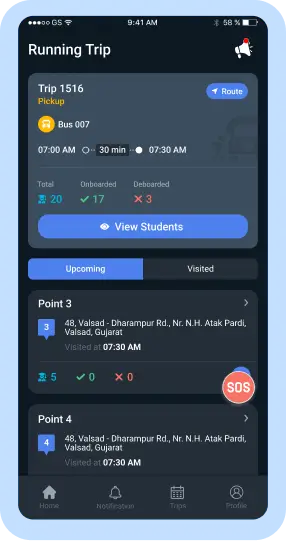
Drivers can easily access assigned trips, planned routes, and stop information to ensure every journey is completed according to schedule. The app provides complete visibility into upcoming and completed trips, helping drivers stay organized throughout the day while reducing operational confusion.
Better Student Management
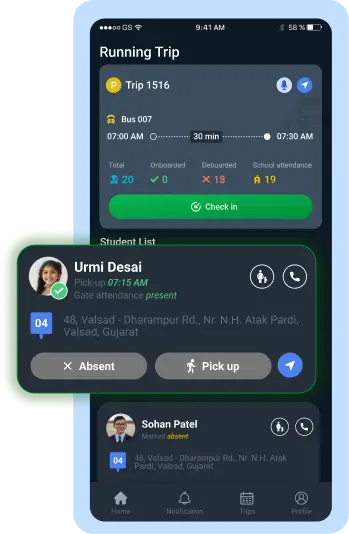
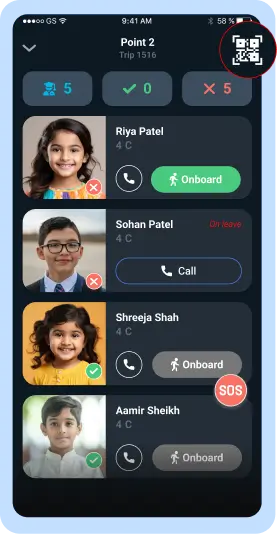
The Driver App makes it easier to manage student transportation by providing complete student information, pickup and drop-off details, attendance lists, and check-in/check-out records. Drivers can quickly verify student movements and maintain accurate transportation records during every trip.
Improved Operational Readiness
Before starting each journey, drivers can verify vehicle allocation via RFID or QR Code, perform vehicle inspections, review trip status updates, and access parent contact information as needed. This ensures every trip begins with complete preparation while improving communication and transportation reliability.
Expand your knowledge on Driver Trip Management
Explore the Complete Guide to Driver Trip Management
Laden Sie das SmartBus-E-Book herunter, um die wichtigsten Funktionen zur Schulbusverfolgung, Sicherheitstools und die Auswirkungen auf den Schülertransport für Schulen und Integratoren kennenzulernen.
Frequently asked Questions
Häufig gestellte Fragen
The Driver App displays all assigned, upcoming, and completed trips along with their schedules and route details.
Yes. Drivers can view the student list, pickup and drop-off details, attendance list, and other relevant student information directly in the app.
Yes. Drivers can verify and record student boarding and drop-off activities through the Student Check-In/Check-Out feature.
Yes. The app provides route visualization along with detailed stop information for every assigned trip.
Drivers can verify vehicle allocation using RFID or a QR Code before beginning the trip.
Yes. The Driver App allows drivers to complete vehicle inspections before starting their assigned journey.
Yes. Drivers can access authorized parent contact details whenever communication is required during transportation.
Yes. The app provides real-time trip status updates throughout the journey.
Yes. Drivers can access attendance lists and verify student boarding and drop-off records during every trip.
By providing complete trip information, student records, route guidance, attendance management, and vehicle readiness in one platform, the Driver App helps drivers operate every trip safely, efficiently, and on schedule.