
Perkenalan
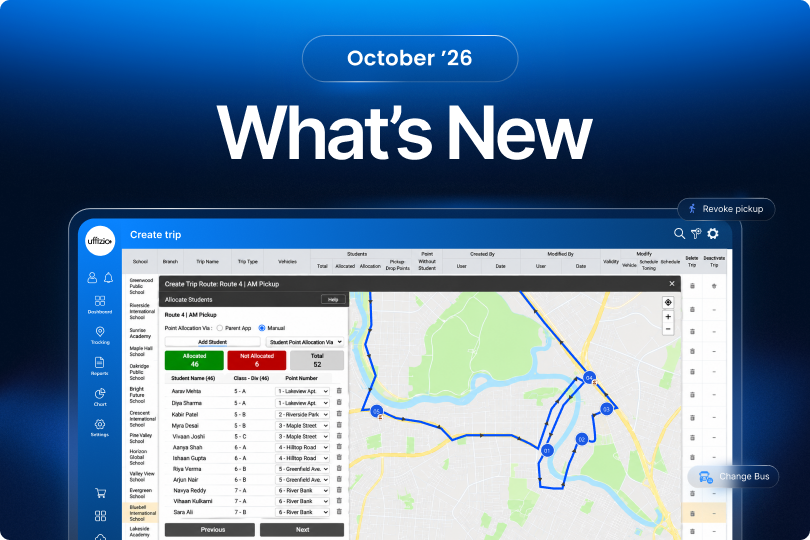
SmartBus introduces new enhancements designed to simplify daily school transport operations, improve student attendance accuracy, and provide better visibility into vehicle assignments and trip performance. From flexible bus selection and attendance corrections to detailed trip reports and student count verification, these updates help schools manage transportation activities more efficiently and accurately.
Explore the latest improvements designed to make school bus monitoring more efficient, reliable, and organised.
Pembaruan SmartBus
1. Bus Selection option in Driver App
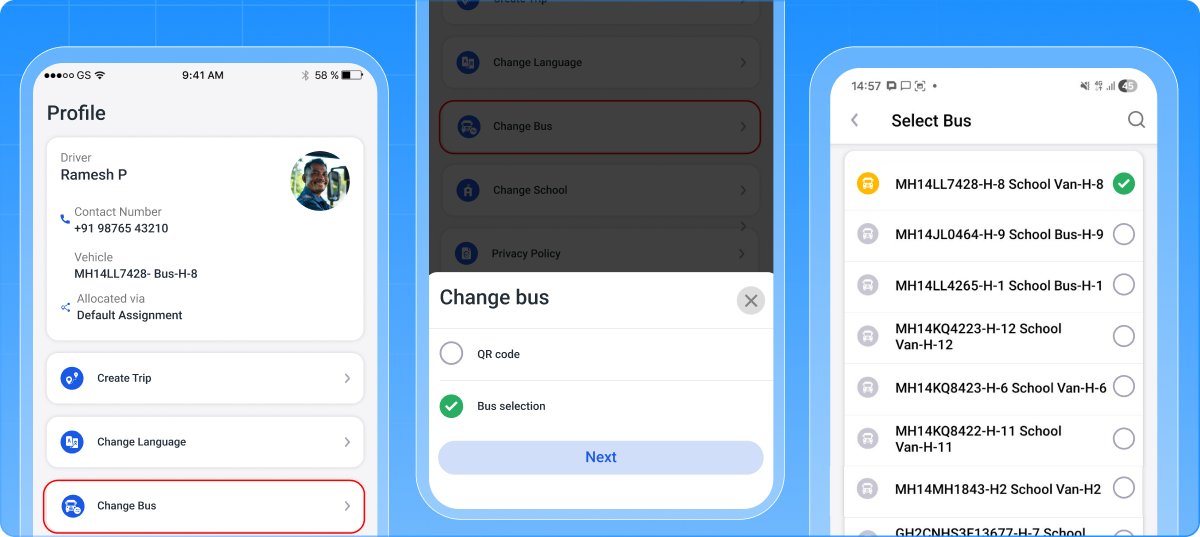
SmartBus now allows drivers and attendants to select their assigned vehicle directly from the Driver App, without depending only on QR code scanning.
Previously, vehicle selection was primarily handled through QR code scanning. With this enhancement, schools can configure how drivers and attendants select or change their vehicles, providing more flexibility in daily transport operations.
What’s Updated
1. School-Level Vehicle Selection Configuration
A new Change Vehicle via Driver App configuration has been added under School → Rule → Trip Rule.
Schools can choose from three options:
- By QR Code Scan: Continues the existing QR code vehicle selection process.
- By Bus Selection: Allows drivers and attendants to select a vehicle manually from the available vehicle list.
- QR Code + Bus Selection: Provides both vehicle selection methods, allowing users to choose their preferred option.
2. Vehicle Selection and Change Workflow
When bus selection is enabled, drivers and attendants can access the Change Vehicle option in the app. They can view their current vehicle, search for and select another available vehicle, and confirm the selection.
Only vehicles belonging to the respective school and not currently running on a trip are displayed. Once selected, the vehicle becomes active for the user, and the updated assignment is reflected across Live Tracking, Trip Tracking, and reports.
3. Driver and Attendant Assignment Control
The system allows one active driver and one active attendant on the same vehicle. Their assignments are managed independently, preventing one user’s selection from unnecessarily affecting the other.
Vehicle changes are restricted during an active trip and become available again after the trip is completed.
What Problem Does This Enhancement Solve?
Previously, drivers needed to scan the vehicle’s QR code to change their assigned vehicle, or the school had to manually allocate a vehicle to them. To simplify this process, the Bus Selection feature allows drivers to select their vehicle directly without depending on QR code scanning or manual allocation.
Manfaat Utama
- Flexible vehicle selection through QR scanning or manual selection.
- Easy vehicle search and selection within the Driver App.
- Prevents selection of vehicles already running on trips.
- Maintains accurate driver and attendant assignments.
- Keeps vehicle information updated across tracking screens and reports.
How Does This Help Our Partners?
Partners can offer schools a more flexible vehicle management workflow. This makes the software adaptable to different transport operations, simplifies vehicle allocation, and helps partners address varying customer requirements without changing the existing QR code workflow.
2. Attendance Revoke Feature in Driver App
Sometimes, drivers or attendants may accidentally mark incorrect student pickup or drop-off attendance, especially when managing students in a hurry. Once attendance is marked, a notification is immediately sent to the parent, and previously there was no option to correct such mistakes during an ongoing trip.
This could result in inaccurate attendance records and confusion for parents. The new Revoke Attendance feature allows drivers and attendants to undo incorrectly marked attendance, record it again correctly, and notify parents about the attendance correction.
What’s Updated
Revoke Pickup
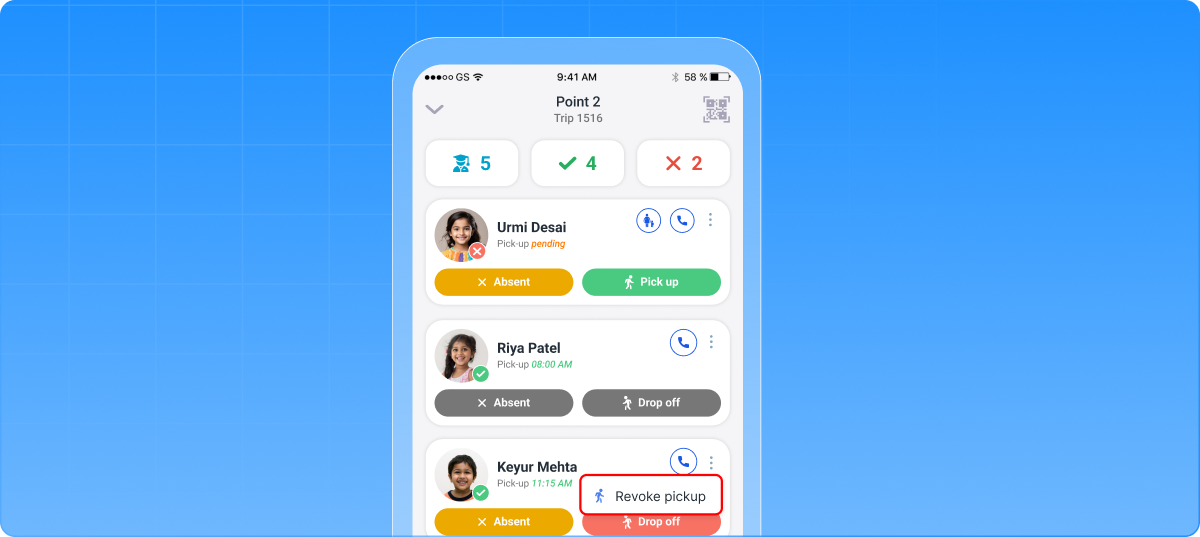
When a student is marked as Picked Up, a Revoke Pickup option becomes available in the Student Card menu.
After selecting this option, the student’s status changes back to Pending Pickup. The driver or attendant can then mark the pickup attendance again correctly.
Revoke Drop Off
When a student is marked as Dropped Off, the menu displays the Revoke Drop Off option.
Once revoked, the student’s status changes to Pending Drop, allowing the driver or attendant to record the drop-off attendance again.
Dynamic Attendance Actions
The revoke option is displayed according to the student’s latest attendance status. Only the applicable action is shown.
Each pickup or drop-off attendance record can be revoked only once. The feature is available during running trips and does not apply to completed trips.
Pickup Notification
When a student is successfully marked as Picked Up, the parent receives an instant notification through the Parent App confirming that their child has boarded the bus.
If the pickup attendance is later revoked due to an incorrect entry, the parent receives another notification about the attendance correction, keeping them informed of the latest pickup status.
What Problem Does This Enhancement Solve?
Previously, incorrect pickup or drop-off entries could result in inaccurate student trip records and reports. The new feature allows drivers and attendants to correct attendance during an ongoing trip, reducing errors in student travel records.
Manfaat Utama
- Corrects incorrectly marked pickup and drop-off attendance.
- Allows attendance to be marked again after being revoked.
- Maintains the latest attendance action and execution details.
- Improves accuracy of trip attendance reports.
- Provides better visibility into attendance corrections.
How Does This Help Our Partners?
Partners can provide transport operators with better attendance control and more reliable student trip records. This helps reduce attendance-related errors, improves reporting accuracy, and strengthens the overall reliability of the school transport monitoring solution.
3. Driver/Attendant Trip Information Report
Previously, there was no single report available to monitor driver and attendant trip performance in one place. Users faced difficulties comparing planned and actual trip distances, identifying delayed trips, and reviewing detailed information such as missed or partially visited checkpoints, unwanted stops, and trip alerts.
This made it challenging to get a complete picture of employee-wise trip performance. To address these gaps, a dedicated report has been introduced to consolidate trip summaries and detailed records for easier monitoring and review.
What’s Updated
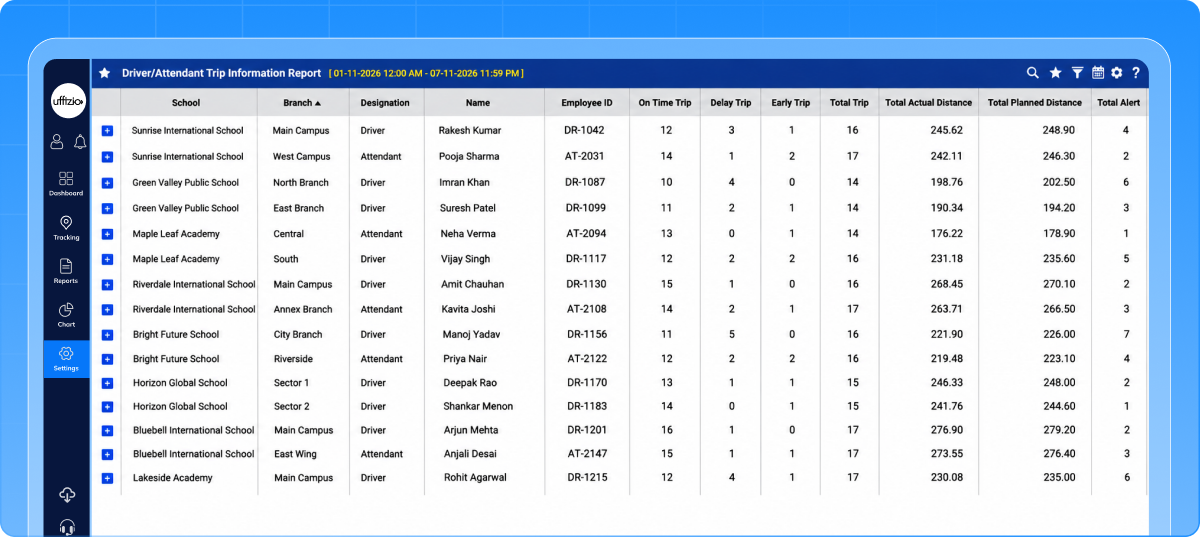
1. Report Filters and Employee-Wise Summary
Users can filter the report by School, Branch, Designation, and Date to review relevant driver or attendant records.
Each summary displays the employee’s school, branch, designation, name, and employee ID, along with trip counts for on-time, delayed, and early trips, total trips, actual and planned distances, and total alerts.
2. Expandable Trip-Level Details
Users can expand a driver or attendant record to view individual trip details, including:
- Trip number, name, type, vehicle, and assignment method.
- Trip start and end times and locations.
- Missed, visited, partially visited, not applicable, and total checkpoint counts.
- Unwanted stop information.
- Actual and planned trip distances.
- Trip delay or early duration and trip status.
3. Report Management Options
The report supports search, sorting, show/hide columns, scheduling, and export. These options help users organise the information they need and download or schedule reports using the selected filters.
What Problem Does This Enhancement Solve?
Previously, users could not easily review driver and attendant trip performance in one report. Comparing planned and actual distances, identifying delays, and checking checkpoint activity required information that was not consolidated.
The new report brings these details together for easier review.
Manfaat Utama
- Provides driver and attendant trip summaries in one place.
- Makes planned and actual distances easier to compare.
- Improves visibility into trip timing, checkpoint activity, and alerts.
- Supports detailed review through expandable trip records.
- Simplifies reporting with scheduling and export options.
How Does This Help Our Partners?
Partners can offer schools a more organised way to review driver and attendant trip performance. Consolidated summaries and detailed records help customers monitor transport operations and investigate trip-related issues using existing trip and tracking data.
4. School-Wise Student Count Report for Billing Verification
A clear school-wise student count is essential for accurate monthly internal billing verification. Previously, administrators had to manually collect student data from individual schools, which required additional time and effort and could lead to difficulties during the billing verification process.
There was also no dedicated report available to consolidate school-wise student totals and compare them with the previous month’s data. This enhancement simplifies the process by bringing all relevant student count details together in one report.
What’s Updated
1. School-Wise Report Access and Filters
The report is available to Admin and Admin subusers.
A School dropdown allows users to view all applicable schools or select a specific school. All is selected by default. The date filter allows users to select a single date within the current month.
2. Student Count and Monthly Comparison
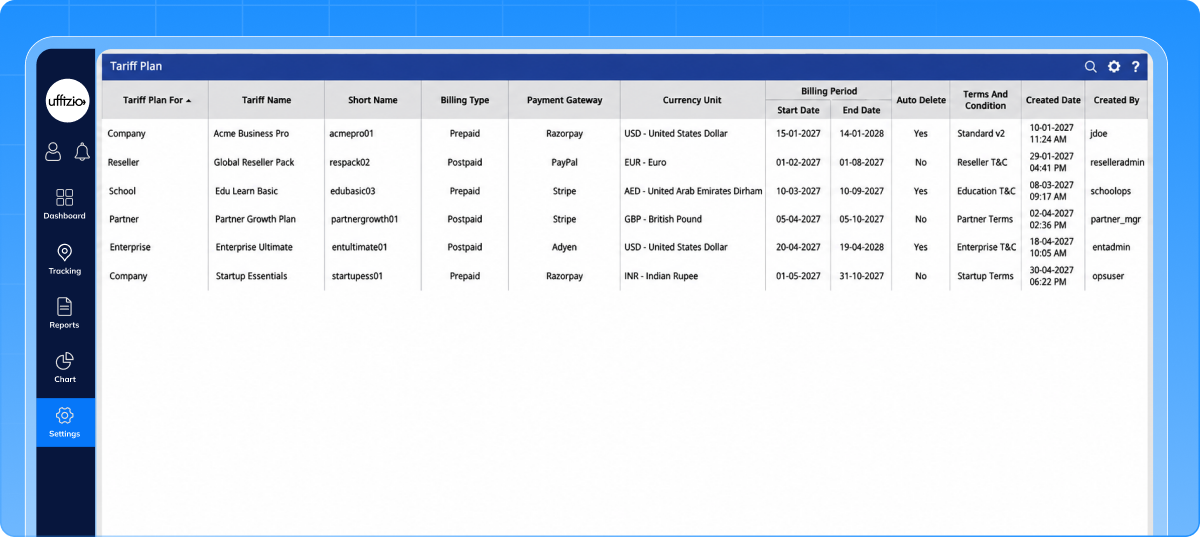
The report displays the following information for each school:
- School: The applicable school name.
- Student: Student count based on the previous day relative to report generation.
- Previous Month Student: The previous month’s student count for comparison.
- Added: Students added during the current month up to report generation.
- Removed: Students removed during the current month up to report generation.
The displayed reporting period runs from the start of the current month through the previous day.
3. Export, Scheduling, and API Access
Users can export the report in XLS and PDF formats for internal review.
Scheduled report generation supports recurring monthly verification, including generation on the 20th of every month.
What Problem Does This Enhancement Solve?
Manually collecting student counts from individual schools takes additional time and can create difficulties during billing verification. The new report consolidates school-wise counts and monthly changes, helping administrators review the relevant data more easily.
Manfaat Utama
- Consolidates school-wise student counts in one report.
- Provides previous-month counts for comparison.
- Shows student additions and removals.
- Supports XLS and PDF downloads.
- Reduces repeated manual effort through scheduled reporting.
How Does This Help Our Partners?
Partners can support customers with a structured report for monthly billing verification. School-wise totals and monthly comparisons help customers review student count changes, while exports and scheduling simplify their internal verification process.
5. Display Assigned Bus Number in Driver Profile
Drivers and attendants previously had no clear indication in the Driver App Profile of which vehicle was currently assigned to them or how the assignment was made.
Since vehicle assignments can happen through multiple methods, such as Default Assignment, QR Scan, Bus Selection, RFID, and Trip Assignment, users could not easily identify the source of their current assignment. This sometimes led to confusion and the possibility of using an incorrectly assigned vehicle, particularly when assignments changed.
What’s Updated
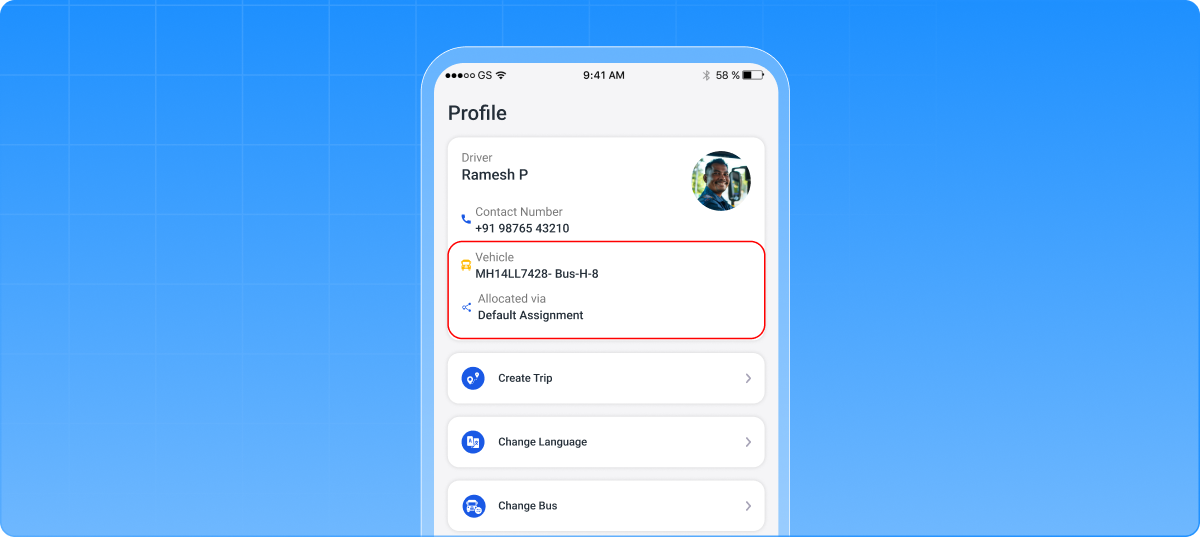
1. Current Vehicle Information
The Profile displays the Plate Number and Vehicle Name for the user’s current active vehicle assignment.
Only the currently active vehicle is shown, helping drivers and attendants identify their assigned bus without confusion from previous or inactive assignments.
2. Allocation Method Visibility
A new Allocated Via field shows how the vehicle was assigned. Supported methods include:
- Default Assignment: Assigned through the standard web application process.
- QR Scan: Assigned by scanning a QR code in the Driver App.
- Bus Selection through App: Assigned through manual vehicle selection in the app.
- RFID: Assigned through RFID.
- Trip Assignment: Assigned through trip allocation.
3. Automatic Assignment Updates
When the active vehicle assignment changes, the Profile automatically updates the displayed vehicle information and corresponding allocation method.
The functionality applies to both drivers and attendants, helping each user view their latest active assignment.
What Problem Does This Enhancement Solve?
Vehicle assignments can happen through several methods, making it difficult for drivers and attendants to confirm their current bus and assignment source.
Displaying this information in the Profile helps reduce confusion, particularly when assignments change, and helps users verify the correct vehicle before use.
Manfaat Utama
- Makes the current Plate Number and Vehicle Name easy to check.
- Shows how the vehicle was assigned.
- Automatically reflects active assignment changes.
- Prevents previous assignments from appearing as the current vehicle.
- Provides consistent visibility for drivers and attendants.
How Does This Help Our Partners?
Partners can offer schools clearer vehicle assignment visibility within the Driver App. This helps transport teams confirm assignments more easily and reduces assignment-related confusion during daily operations.
6. Indication of Stops Without Students
Previously, there was no separate count or visual indication to identify trip checkpoints without assigned students. Users had to manually review each checkpoint to find stops with no student allocation, which required additional effort.
Additionally, changes in student assignments were not clearly reflected on the trip configuration map, making it difficult to track the latest allocation status. This enhancement addresses these gaps by providing a dedicated count and visual indication for checkpoints without assigned students.
What’s Updated
1. Point Without Student Count
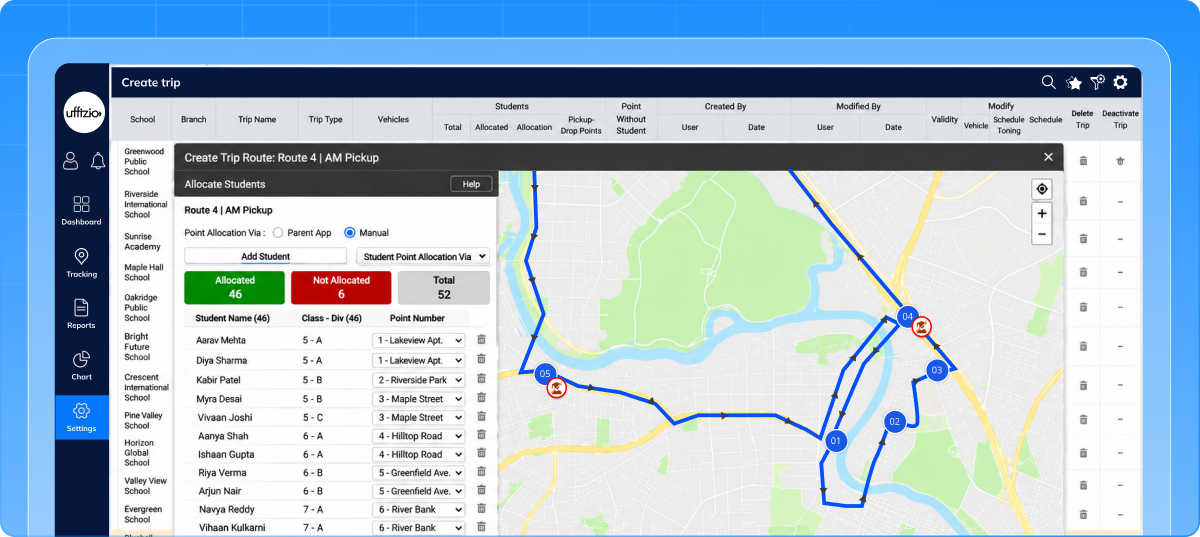
A new Point Without Student column has been added to the Create Trip screen.
It displays the number of checkpoints with zero assigned students. When every checkpoint has at least one student assigned, the count displays 0.
2. Visual Indication on the Map
Checkpoints without assigned students are marked differently from normal checkpoints on the trip configuration map.
The same indication appears during both trip creation and modification, helping users quickly identify stops that need their attention.
3. Updates Based on Student Assignment
The count and map indication reflect the latest student assignments.
When a student is assigned to a previously unassigned checkpoint, the Point Without Student count reduces accordingly, and the map indication updates to reflect the change.
What Problem Does This Enhancement Solve?
Previously, users had to manually review checkpoints to identify stops without students. Assignment changes were also not clearly visible on the trip configuration map.
This enhancement makes those checkpoints easier to identify and helps users review student allocation while creating or modifying trips.
Manfaat Utama
- Shows the number of checkpoints without assigned students.
- Makes these checkpoints easy to identify on the map.
- Reduces manual checking of checkpoint assignments.
- Reflects changes in student allocation.
- Provides consistent visibility during trip creation and modification.
How Does This Help Our Partners?
Partners can offer schools clearer visibility into student assignments across trip checkpoints. This helps transport teams identify stops without students more easily and review trip configurations with less manual effort.
Kesimpulan
The October updates bring meaningful improvements to SmartBus, making school transport operations more flexible, accurate, and easier to manage. From simplified vehicle selection and attendance corrections to detailed trip monitoring, billing verification, and better student allocation visibility, these enhancements address practical challenges faced by schools and transport teams. Together, they strengthen operational efficiency, improve transparency, and support more reliable school transportation management. SmartBus continues to evolve to meet the changing needs of schools and transport operators.