Dashboard and Widgets

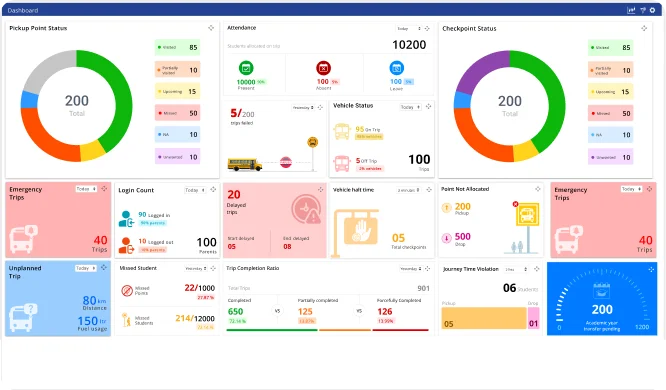
Monitor school transportation operations from a centralized and interactive dashboard with the Admin App. The Dashboard and Widgets feature provides administrators with real-time operational insights, live trip visibility, attendance records, key performance indicators, alerts, and customizable widgets. With all critical transportation data available in one place, administrators can make faster decisions, improve operational efficiency, and maintain complete control over daily transport activities.

Spotlight

Highlights of Panel de control y widgets

The Admin App transforms transportation data into meaningful insights through an intelligent dashboard. Administrators can monitor live operations, track performance, identify important events, and personalize their workspace to efficiently manage school transportation from a single interface.

Centralized Operational Visibility

Gain a complete overview of daily transportation activities through a unified dashboard. Administrators can instantly access live operational information, monitor ongoing activities, and stay informed about the overall performance of school transportation without switching between multiple screens.

Data-Driven Decision Support

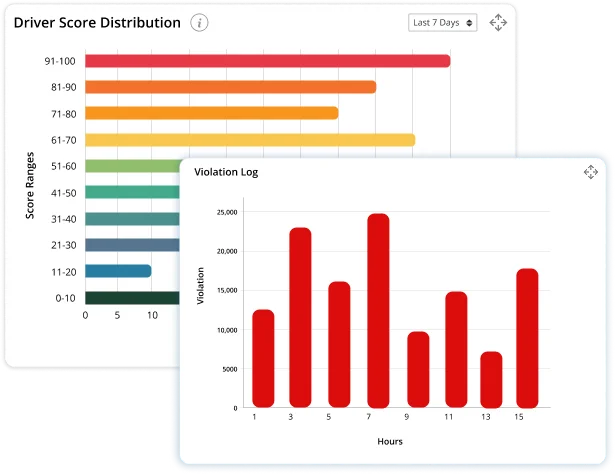
Make informed operational decisions with meaningful transportation insights. Interactive reports, visual summaries, and performance indicators help administrators evaluate daily operations, identify trends, and improve transportation planning based on real-time information.

Personalized Monitoring Experience

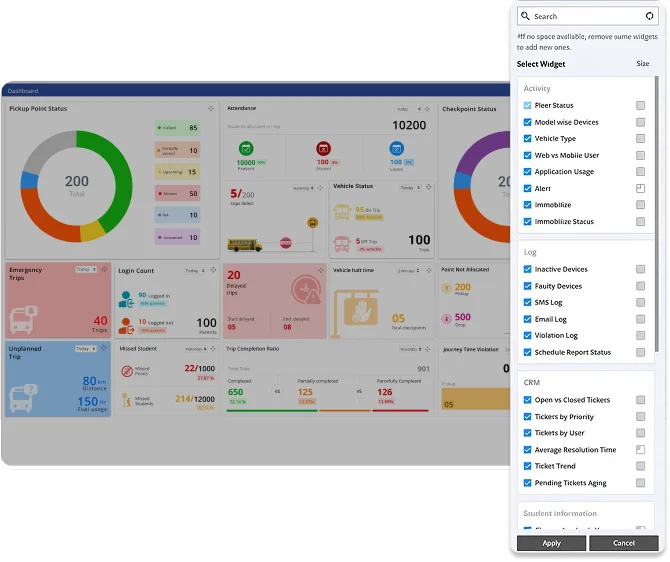
Customize the dashboard according to operational priorities for faster access to the most important transportation information. Flexible widgets and configurable layouts allow administrators to focus on the metrics and updates that matter most to their organization.

Características

Expand your knowledge on Panel de control y widgets

Trip Dashboard
Panel de control del viaje
Monitor trip status, schedules, and progress from a single dashboard.
Attendance Records
Attendance Records
View and manage student attendance records across all trips.
Active Trips
Active Trips
Track all ongoing school bus trips with live operational updates.
Dashboard Analytics
Análisis del panel de control
Analyze transport performance through visual reports and key metrics.
Alerts Overview
Alerts Overview
View all transport alerts and notifications from one centralized screen.
Customisable Widgets
Widgets personalizables
Personalize the dashboard with widgets based on operational priorities.
Ebook

Explore the Complete Guide to Dashboard and Widgets

Descarga el libro electrónico de SmartBus para explorar las principales funciones de seguimiento de autobuses escolares, las herramientas de seguridad y cómo transforma el transporte de estudiantes para escuelas e integradores.

Questions

Frequently asked Questions

Preguntas frecuentes

What information is available on the Dashboard and Widgets page?

The dashboard provides live transportation data, attendance records, active trips, operational analytics, alerts, KPIs, and other important information in a centralized view.

Can administrators monitor active trips in real time?

Yes. The Admin App displays all active trips with real-time updates, allowing administrators to monitor transportation activities continuously.

Does the dashboard provide transportation analytics?

Yes. Dashboard Analytics offers valuable insights into transportation performance, operational trends, and daily activities to support better decision-making.

Can administrators customize dashboard widgets?

Yes. The dashboard supports customizable widgets, allowing administrators to personalize the layout based on their operational requirements.

What are KPI Widgets used for?

KPI Widgets display important transportation metrics, helping administrators quickly monitor operational performance and key business indicators.

Can the dashboard display attendance records?

Yes. Administrators can view student transportation attendance records directly from the dashboard for quick monitoring.

Does the dashboard show important transportation alerts?

Yes. The Alerts Overview highlights critical transportation events and notifications, enabling administrators to respond promptly.

Can administrators check parent app activity?

Yes. The Parent Login Status widget helps administrators monitor parent application login activity and engagement.

What is the Trip Dashboard used for?

The Trip Dashboard provides a consolidated view of trip-related information, helping administrators monitor trip performance and operational status efficiently.

How do dashboards and Widgets improve transportation management?

By combining live monitoring, operational analytics, customizable widgets, and real-time insights into one interface, the Admin App enables administrators to manage school transportation more efficiently, make faster decisions, and maintain complete operational visibility.

¡Conectemos!

Cargando...